Our top picks at a glance
A printer at this level is the hardest kind of purchase to undo: a heavy box, a week of setup, and a machine that shapes a hobby for years. The expensive mistake is not choosing a bad printer, because there are no bad printers in this ten. It is choosing the wrong kind: resin detail when you needed strong brackets, or a big filament machine when your miniatures deserved better.
The Bambu Lab P1S Combo leads the guide because it is the most complete answer here: enclosed, fast, and four colours in the box. Behind it, the ten split along the fault line that matters most, filament against resin, with open ecosystems and locked-in ones on both sides of the divide.
So decide the material first and the model second. If your prints will be used, dropped, drilled or worn, start with the six filament machines. If they will be painted, displayed or played with across a tabletop, start with the four resin machines, and let the decision section below settle the rest.
 Bambu Lab P1S ComboBest overall,Check price on Amazon
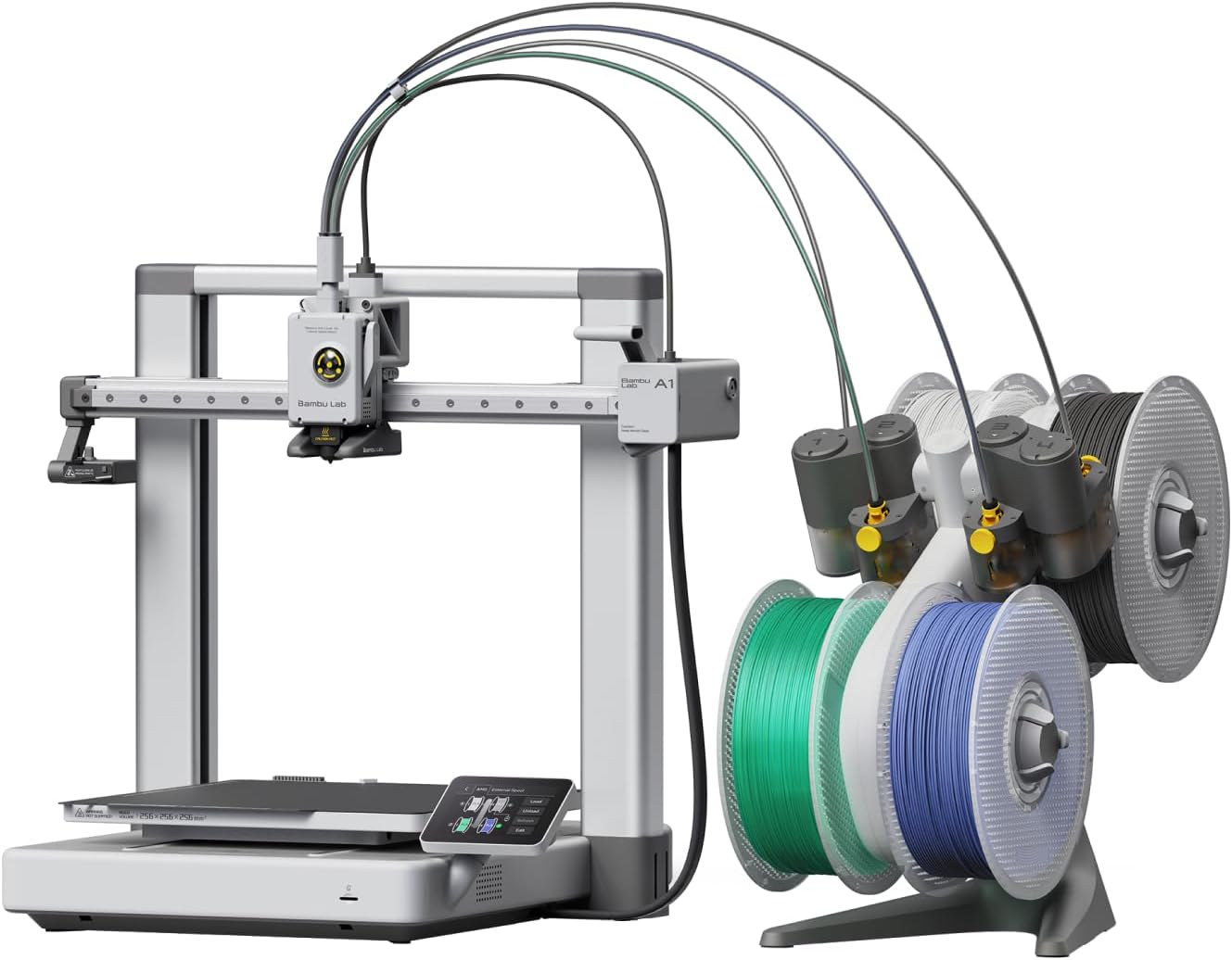 Bambu Lab A1 ComboBest for first-time buyers,Check price on Amazon
 Elegoo Centauri 2 ComboBest value four-colour CoreXY,Check price on Amazon
 Creality K1CBest for engineering filaments,Check price on Amazon
 Flashforge Adventurer 5M ProBest enclosed printer for shared rooms,Check price on Amazon
 Flashforge AD5XBest compact four-colour printer,Check price on Amazon
 Elegoo Saturn 4 UltraBest resin printer overall,Check price on Amazon
 Anycubic Photon Mono M7Best resin printer for automation,Check price on Amazon
 Elegoo Mars 5 UltraBest compact resin printer for miniatures,Check price on Amazon
 Elegoo Saturn 4Best value on the big resin plate,Check price on Amazon
Prices move up and down on Amazon, so we never print a price here that could be stale by the time you read it. Use the price check button to see the current price.
The Best 3D Printer Under 500
Each review below sticks to what can be verified: dimensions, speeds, materials and the hardware in the box.
Bambu Lab P1S Combo
This is the enclosed all-rounder the rest of the guide is measured against. A sealed chamber with a carbon filter keeps ABS and ASA from warping, the AMS box feeds four spools and swaps colours or materials mid-print, and the 256 mm cube swallows helmets, storage systems and prototypes. Speed is real: the CoreXY frame and its 500 mm/s headline figure cut hours from long jobs. Bambu Lab also publishes emissions test results for printer and filament combinations measured against the UL 2904 method. The compromises are ecosystem ones: automatic spool recognition needs Bambu Lab's own tagged filament, and fibre-filled filaments are off the menu on the stock setup. Buy it to cover almost everything with one machine. Skip it if you plan to live on carbon-filled nylon.
Pros
- Fully enclosed chamber with carbon filter, ready for ABS and ASA
- AMS four-spool unit included for colour and material swaps
- 256 x 256 x 256 mm build volume at up to 500 mm/s
- Auto bed levelling with vibration compensation built in
Cons
- Fibre-filled filaments are not recommended on the stock setup
- Automatic spool recognition works only with Bambu Lab RFID filament
- Small monochrome control screen, with no touchscreen
Bambu Lab A1 Combo
The A1 Combo trades the sealed box for simplicity, and for a first printer that trade usually wins. It prints the same 256 mm cube as its enclosed sibling at the same headline speed, with the AMS lite unit handling four colours from a stand beside the machine. Setup is measured in minutes, the touchscreen walks you through loading filament, and automatic flow calibration takes the fiddliest first-week chore off the table. What you give up is material range: with no enclosure around the print, ABS and ASA warp as they cool, so in practice this is a PLA, PETG and TPU machine. Buy it if your first printer needs to succeed on day one. Skip it if engineering filaments are the whole point of the purchase.
Pros
- AMS lite four-colour unit included in the box
- Automatic flow calibration and a guided touchscreen setup
- The same 256 x 256 x 256 mm build volume as the enclosed P1S Combo
- The lightest machine in this guide at 8.3 kg
Cons
- Open frame rules out reliable ABS and ASA printing
- AMS lite spools sit open to the air instead of inside a sealed box
- The moving bed needs clear desk depth in front of and behind the machine
Elegoo Centauri 2 Combo
Elegoo built the Centauri 2 Combo by taking parts off its enclosed flagship and keeping the ones that matter most at this level: a rigid die-cast CoreXY frame, a 256 mm cube, and the CANVAS four-colour feeder with automatic refill and tangle detection. The nozzle still reaches 350 °C and the bed 110 °C, but with open air around the print those numbers flatter it: ABS, ASA and nylon stay unreliable without a chamber, so the honest material list is PLA, PETG, TPU and PLA-CF. There is no camera and no chamber light, so checking a print means walking over to it. Buy it if four colours and a big build volume matter more than engineering materials. Skip it if your parts need a warm, sealed chamber.
Pros
- CANVAS four-colour system with auto refill included in the box
- 256 x 256 x 256 mm build volume on a rigid CoreXY frame
- 350 °C nozzle and 110 °C bed, both high figures for this level
- 5-inch colour touchscreen and Wi-Fi printing
Cons
- Open frame, so high-temperature filaments warp despite the hot nozzle
- No camera or chamber light for checking prints from another room
- Spool holders fit a limited range of spool core sizes, 53 to 58 mm
Creality K1C
The K1C is the specialist of the ten: an enclosed CoreXY machine built around carbon fibre filament. Its hotend handles PLA-CF, PA-CF and PET-CF on the stock hardware, the chamber keeps ABS and ASA flat while they print, and an air purifier plus an AI camera keep watch over long jobs. It is also the most open filament machine here, taking any brand of 1.75 mm spool without tags, accounts or adapters. The trade is size and colour: the 220 by 220 by 250 mm build volume is a step down from the 256 mm cubes, and there is no multi-colour system in the box. Buy it if your printing is brackets, gears, jigs and drone frames. Skip it if four-colour models are what you actually want to make.
Pros
- Prints carbon fibre filaments on the stock hardware, no upgrades needed
- Fully enclosed, with an air purifier and an AI camera
- Open filament system that takes any 1.75 mm brand
- Up to 600 mm/s headline speed
Cons
- Smaller build volume than the 256 mm machines in this guide
- No multi-colour system included in the box
- The enclosed chamber is passively heated, with no active chamber heater
Flashforge Adventurer 5M Pro
Filtration is the whole argument for the Adventurer 5M Pro. Air inside the sealed chamber circulates through HEPA and activated carbon filters, and a second, external loop cleans air on its way out, which is why this is the enclosed machine that fits a classroom, a studio flat or a family room. Around that system sits a competent CoreXY printer: a 220 mm cube, quick-swap nozzles in four sizes, a monitoring camera, and a 280 °C hotend that covers ABS, ASA and fibre-filled PETG once the larger nozzles are fitted. Buy it if the printer will share air with people all day. Skip it if build volume outranks everything else on your list.
Pros
- Two HEPA filters and a carbon one clean the air, on loops inside and out
- Quick-swap nozzles in 0.25, 0.4, 0.6 and 0.8 mm sizes
- Built-in camera and a low-noise mode for shared spaces
- Fully enclosed, so ABS and ASA print reliably
Cons
- 220 x 220 x 220 mm is the joint smallest FDM build volume in this guide
- Printing speed tops out at 300 mm/s; the 600 mm/s figure is travel speed
- Single colour only, with no multi-material unit in the box
Flashforge AD5X
The AD5X squeezes four-colour printing into one of the smallest footprints in this guide. Its IFS unit mounts four spools on the side of an open CoreXY frame and swaps between them automatically, so colour models, labelled parts and multi-material prototypes come off a machine that still fits on a shelf or a side desk. A 300 °C nozzle and a fully open spool system keep filament choice wide, automatic levelling keeps setup short, and the colour touchscreen is the clearest control panel among the open-frame picks. What it cannot do is seal the print in: warp-prone filaments such as ABS and ASA stay unreliable without a chamber around them. Buy it if colour matters and your space is tight. Skip it if a sealed, filtered chamber is a requirement.
Pros
- Four-colour IFS system included, with automatic loading and unloading
- Compact 363 x 402 x 448 mm footprint at 11.4 kg
- 300 °C nozzle and open spools from any brand
- It connects by Wi-Fi, Ethernet and USB
Cons
- Open frame keeps high-temperature filaments unreliable
- The 600 mm/s figure is travel speed; printing runs at up to 300 mm/s
- Four side-mounted spools widen the working footprint beyond the frame
Elegoo Saturn 4 Ultra
The Saturn 4 Ultra is the complete resin package. Its plate is the joint largest here at 218.88 by 122.88 mm, the 12K screen holds 19 by 24 micron detail across it, and the vat tilts to peel each cured layer free, which is how it reaches up to 150 mm/h without tearing supports off the plate. Automatic levelling, a camera that watches the print, and sensors that flag foreign objects and low resin all shrink the list of ways a resin job can fail overnight. None of that removes the resin routine itself: gloves, washing, curing and ventilation still apply to every print. Buy it if detail and plate size both matter to you. Skip it if you want the same screen for less and can live without the speed.
Pros
- Tilt release lifts output to up to 150 mm/h on a large 12K plate
- AI camera monitoring, plus foreign object and low resin alarms
- One-touch automatic levelling with built-in self-checks
- Flip-up lid, so the machine needs no extra bench depth to open
Cons
- No heated resin tank, so cold rooms slow printing down
- The full wash and cure routine still applies to every print
- Flexible build plates cannot be fitted to this model
Anycubic Photon Mono M7
The Photon Mono M7 automates the chores resin printers usually leave to their owners. It refills the vat from its resin bottle during prints and draws resin back afterwards, watches for failed prints and falling resin levels, and tracks how much life the release film has left, so long jobs need fewer check-ins. Its 14K screen carries the highest pixel count in this guide across the joint largest plate, and with high-speed resin loaded it prints at up to 150 mm/h. The cost of all that help is complexity: more pumps, tubes and sensors to keep clean than any other resin machine here. Buy it if you run long resin jobs and want the machine to look after itself. Skip it if you prefer the simplest possible vat and plate setup.
Pros
- Automatic resin refill during printing and withdrawal afterwards
- Failed print detection, resin level monitoring and release film life tracking
- 14K screen, the highest pixel count in this guide
- Files reach it by USB, Wi-Fi and LAN
Cons
- More pumps and sensors mean more parts to clean and maintain
- The top speed needs high-speed resin; standard resin runs at up to 90 mm/h
- At 520 mm tall it needs generous shelf or bench clearance
Elegoo Mars 5 Ultra
Everything the Saturn 4 Ultra does well, the Mars 5 Ultra does in miniature. The same tilt release system, one-touch automatic levelling and AI camera sit above a plate of 153.36 by 77.76 mm, which sounds small until you picture it loaded: a full squad of 32 mm miniatures fits with room to spare. XY detail is 18 microns, the whole machine weighs just 8.8 kg, and its footprint is the smallest of the four resin picks. The limit is equally obvious: cosplay pieces, terrain boards and anything tall simply will not fit inside a 165 mm build height. Buy it if your printing is miniatures, jewellery or other small, fine work. Skip it if your models regularly outgrow a postcard-sized plate.
Pros
- Tilt release and up to 150 mm/h top speed in a compact body
- Its 9K screen resolves detail in XY down to 18 micron
- Automatic levelling with AI camera monitoring
- Smallest footprint of the resin picks at 260 x 268 mm
Cons
- Smallest build volume in the guide at 153.36 x 77.76 x 165 mm
- The plate fills quickly when batch printing larger figures
- Resin handling and ventilation costs still apply in full
Elegoo Saturn 4
The Saturn 4 is the Ultra with the expensive motion hardware taken out. You keep the same 218.88 by 122.88 mm plate, the same 12K screen, the same automatic levelling and the same resin safety alarms, and you give up the tilting vat, the monitoring camera and Wi-Fi. Prints therefore rise at up to 70 mm/h instead of 150, and files reach the machine on a USB stick rather than over the network. For miniatures and display models, where a full plate takes hours either way and the finished detail is identical, that is a rational trade, not a compromise. Buy it if you want the big Elegoo plate and 12K detail without paying for speed. Skip it if you print to deadlines or want to watch jobs from another room.
Pros
- The same 12K screen and plate size as the Saturn 4 Ultra
- Automatic levelling, with foreign object and low resin alarms
- Flip-up lid, so no extra bench depth is needed to open it
- Fully open resin system, any 405 nm resin
Cons
- No tilt release, so top speed is 70 mm/h, under half the Ultra figure
- USB file transfer only, with no Wi-Fi or camera
- Smaller 3.5-inch resistive touchscreen
FDM or Resin: The Choice That Decides Everything Else
Every other choice in this guide (enclosure, colour system, ecosystem) sits downstream of one decision: whether your printer builds parts by melting plastic filament or by curing liquid resin with light. Filament, called FDM, lays down visible lines of tough plastic and makes big, useful objects cheaply. Resin printing hardens one thin layer at a time under a screen, and trades size and toughness for surface detail no filament machine at any price can match. Neither is better in the abstract; they are different tools that happen to share a shelf.
| Point of difference | FDM filament | Resin |
|---|---|---|
| Build volume | 220 to 256 mm cubes; helmets, boxes and brackets print whole | Plates from 153 x 78 mm to 219 x 123 mm; parts stay small |
| Fine detail | Layer lines stay visible, even at the finest settings | XY detail of 17 to 24 microns; faces, cloth and textures survive |
| Cost of material | Filament is the cheapest way to make a large part | Resin costs more per part, and washing adds its own consumables |
| After the print | Peel away the supports and the part is finished | Wash in alcohol and cure under UV light, every single time |
| Working strength | PETG, ABS and fibre-filled filaments make load-bearing parts | Standard resins are brittle; tough resins narrow the gap at a price |
| Colour | Four colours or materials in one print on four of the six FDM picks | One resin per vat; colour means painting the model afterwards |
| Where it can live | Enclosed models filter their air; open frames want a ventilated room | Needs ventilation, gloves and a wash area wherever it sits |
Choose FDM if... your prints are useful objects: brackets, enclosures, storage, tools, cosplay armour, anything that gets handled, drilled, screwed or dropped. The P1S Combo, K1C and A1 Combo are where to start.
Choose resin if... your prints are looked at more than they are used: miniatures, display models, jewellery masters and fine prototypes, where the surface is the product. The Saturn 4 Ultra and Mars 5 Ultra are the two ends of that range.
Choose an enclosed FDM machine if... the printer will live in a bedroom, classroom or shared flat. Choose an open frame only where a door can close on it or a window can open beside it, and apply the same rule twice over to resin.
Ecosystems cut across both camps. Bambu Lab's AMS units and Elegoo's CANVAS read tagged spools from their own brands and set themselves up automatically, while still accepting ordinary spools with a little manual setup. Creality and Flashforge stay fully open: any 1.75 mm filament, no tags, no accounts. Resin is open on material everywhere (any 405 nm resin pours into any vat in this guide) and locked in instead through spare parts and workflow: vats, films, screens and wash stations are model-specific, so your second-year costs follow the brand you chose on day one.
Also considered
- Elegoo Saturn 4 Ultra 16K: finer pixels across the same plate plus a heated resin tank, but its Amazon price sat above this guide's ceiling when checked, so it stays outside.
- Anycubic Photon Mono M7 Pro: adds a resin heater and faster standard-resin printing to the M7 formula, and it too sat above the ceiling on Amazon at research time.
- Anycubic Kobra S1 Combo: an enclosed four-colour machine with a drying filament unit is a strong formula, but its Amazon availability proved too inconsistent to recommend against a hard budget.
- QIDI Q1 Pro: a heated-chamber favourite while it lasted. The maker has discontinued it and Amazon availability has dried up, so it cannot anchor a buying guide.
- Prusa MINI+: a dependable open-frame machine that is sold direct by its maker; reseller prices sit above the ceiling, leaving no in-band Amazon route to it.
Who this guide is for
First-time buyers who want prints that work out of the box
If this is your first printer, your real enemy is the failed first week: a bed that will not level, filament that will not feed, a first print that peels off the plate. The A1 Combo and P1S Combo exist for you, because their calibration is automatic, their colour systems arrive in the box, and their failure modes are the fewest here. Pick one of those two and learn the hobby on finished prints instead of on troubleshooting.
Hobbyists printing functional parts and prototypes
If your prints hold weight, take screws or live outdoors, you are shopping the enclosed half of the filament six. The K1C prints carbon fibre filaments on stock hardware, the P1S Combo wraps a 256 mm cube in a filtered chamber, and the Adventurer 5M Pro adds serious air filtration. Resin can prototype the shape of a part beautifully, but standard resins snap where PETG and ABS flex.
Miniatures and tabletop gamers who need fine detail
If your prints are 28 to 54 mm figures with faces, weapons and cloth folds, filament layer lines will read as damage at that scale, and no setting fixes physics. The resin four are your shortlist: the Mars 5 Ultra for a dedicated miniatures bench, the Saturn 4 pair for full plates of figures, and the Photon Mono M7 if you run long batches and want the machine to manage its own resin supply.
What to look for when buying a 3D printer
- Build volume before speed Headline speeds are travel figures as often as printing figures, and no speed helps a part that does not fit. Measure the largest thing you realistically print, then buy the volume that holds it.
- An enclosure decides your materials PLA and PETG print happily in open air. ABS, ASA and nylon blends warp without a warm chamber, so if engineering filaments are on your list, an enclosed pick is not optional.
- How locked in you will be Tagged-spool systems set themselves up and cost you freedom; open systems take any filament and make you type in the settings. On resin, the material is open everywhere and the lock-in hides in vats, films and screens instead.
- On resin, the micron figure is the detail figure A 12K or 14K label describes the screen's pixel count, which spreads thinner as plates grow. XY detail in microns is the number that decides how fine a face or a gear tooth can be.
- Filtration and ventilation are buying criteria, not accessories Hot plastic and liquid resin both put compounds into room air, in amounts that rise with material temperature. An enclosed, filtered machine can share a room; an open one needs a room you can air out.
Sizes, fit and space for a 3D printer
Footprints in this guide run from 355 x 355 mm for the K1C to 500 x 480 mm for the Centauri 2 Combo, and the footprint is only the start of the space question. The A1 Combo's bed travels forward and back, so it needs clear desk depth well beyond its 465 mm width figure. The AD5X carries its four spools on the side, widening its working footprint past the frame. Leave room above every machine too: filament feeds from the top on the Combos, and lids need swing space.
Resin machines stand tall instead: the Saturn pair measure 548 mm high and the Photon Mono M7 520 mm, so low shelves rule them out. Resin also takes up floor space beside the printer, because every print travels from vat to wash bath to curing light, dripping as it goes. Plan a washable work surface, a sealed bin for contaminated waste, and storage for gloves and alcohol before the printer arrives, not after the first spill.
Ventilation belongs in the same plan. UL Standards & Engagement publishes ANSI/CAN/UL 2904, the standard test method for particle and chemical emissions from 3D printers, which gives buyers a common yardstick for what a machine releases into a room. Use it as your rule of thumb: the hotter and more exotic the material, the more seriously you should take extraction, and no printer of either type belongs in a sealed bedroom.
What 3D printers at this level cost to own
The printer is the cheap part of 3D printing; the material is the subscription you never cancel. A hobbyist printing weekly will burn through several kilograms of filament a year, and resin users pay more per finished part once washing alcohol, gloves and paper towels join the bottle price. Budget for both types from the start, because a printer that sits idle for lack of a twenty-dollar spool is the worst value in this guide.
Wear parts follow. Nozzles erode, fastest under fibre-filled filaments. Build plates lose their grip and get replaced. On resin machines the release film clouds and tears, vats wear, and the LCD screen itself is a consumable with a finite life. Filters count too: the carbon and HEPA elements in the enclosed picks are replaceable parts with their own replacement rhythm, and a clogged filter quietly turns an enclosed printer into an open one.
Support and spares are where ecosystems show their real prices. Big ecosystems keep nozzles, plates, films and screens in stock for years and answer through dedicated channels; Elegoo runs a support contact page covering orders, machines and parts, and every maker in this guide does the same. Warranties at this level typically cover the machine for a year and wear parts (nozzles, screens, films) for far less or not at all, so the honest running-cost question is not whether parts wear, but whether yours will still be on a shelf when they do. Delivery is the last cost: these are heavy boxes, up to roughly 19 kg packed for the largest resin machine, so check the return window before you order. A printer that fails in its first week goes back far more easily in its original packaging.
Common mistakes when buying a 3D printer
- Buying on the headline speed A 600 mm/s travel figure moves an empty print head, not your finished part. Real print times depend on acceleration, cooling and the model's shape, and the gap between rivals is far smaller than the boxes suggest.
- Forgetting the wash and cure half of resin The printer is only part of a resin setup. Washing solution, a curing light or station, gloves, filters and a ventilated work area are required spending, and skipping them is how resin ends up printed unsafely on a kitchen table.
- Putting an open-frame printer in a bedroom Open FDM machines and all resin printers release odours and fine particles while they run. If the only home for the printer is the room where someone sleeps, an enclosed and filtered pick (or a different room) is the answer.
- Assuming four colours are free Every colour change purges filament out of the nozzle, so multicolour prints consume extra material and extra hours. The waste is worth it for the right models and a surprise on your first spool bill if nobody told you.
- Throwing the packaging away on day one Run the first prints, check the machine over, and only then recycle the box. Printers are among the most returned machines in home tech, and a return in the original box with its foam is a formality; a return without it is an argument.
3D Printer Pros and Cons
Pros
- Enclosed CoreXY speed and four-colour printing, features that cost twice as much a few years ago, now sit comfortably inside this budget
- Resin detail that used to mean a professional machine is available at 18 to 24 microns on four picks here
- Automatic bed levelling is standard across all ten picks, removing the classic first-week failure
- Material choice is wide on both sides: carbon fibre filaments on one end, dozens of resin types on the other
Cons
- Headline speeds describe travel or ideal conditions, so real print times sit far closer together than the marketing implies
- Running costs never stop: filament, resin, films, nozzles, filters and washing supplies are a permanent second spend
- Resin printing is wet, chemical work that needs ventilation, gloves and a cleanup routine after every job
- Ecosystems still steer your shelf: tagged spools, model-specific vats and screens follow the brand you picked first
Who should not buy a 3D printer at this level
Skip this entire category if you need parts bigger than a 256 mm cube or taller than 230 mm, production runs of identical parts, or prints that hold certification for load, food contact or medical use; those jobs belong to larger or industrial machines. Skip resin specifically if you cannot ventilate the room, cannot keep children and pets away from liquid resin, or want a machine you can leave running in a bedroom. And skip every pick here if your budget ends at the printer itself: without room for filament, resin and wear parts, the honest purchase is a cheaper machine and a stocked shelf.
Best 3D Printer Under 500: Frequently Asked Questions
Should my first 3D printer be FDM or resin?
For most first-time buyers, FDM. A filament machine prints bigger, tougher and cheaper parts, asks for no chemicals, and its failures are visible and forgiving. Resin is the better first printer only when your reason for buying is detail itself (miniatures, jewellery, fine models) and you have a ventilated space and the patience for washing and curing every print.
Can a 3D printer under 500 print strong functional parts, or only decorative models?
Both, if you choose the right filament machine. PETG, ABS, ASA and carbon fibre blends from the enclosed picks here produce brackets, jigs, enclosures and replacement parts that take real loads and real weather. Strength follows material and design more than price: the K1C and P1S Combo print the same engineering filaments as far more expensive machines. Resin is the decorative side of the guide unless you pay for specialist tough resins.
What else do I need to budget for besides the printer?
Start with material: spools of filament or bottles of resin are a permanent running cost. Filament owners add spare nozzles and a build plate over time. Resin owners add washing alcohol or detergent, a curing light or wash and cure station, nitrile gloves, and replacement release film and eventually a screen. Both camps should keep a little aside for filters on enclosed machines and for the failed prints every beginner produces while learning.
Does a 3D printer need an enclosure, and where can a resin printer run safely?
An enclosure is a materials decision: PLA and PETG do not need one, while ABS, ASA and nylon blends warp without a warm chamber, and an enclosed machine with filtration is also the right pick for shared rooms. A resin printer needs a ventilated workspace you can clean, gloves for every handling step, and distance from bedrooms and food preparation. Run it where a window or extractor clears the air, and treat uncured resin and its wash liquid as chemicals, not as craft supplies.
How much four-colour printing can I get at this level, and what does it cost in filament?
Four of the six filament picks here (the two Bambu Lab Combos, the Centauri 2 Combo and the AD5X) print four colours or materials in one job with their feeder units included. The hidden cost is purging: every swap pushes a plug of filament out of the nozzle, so a model with hundreds of swaps can waste a noticeable share of a spool and add hours to the print. Single-colour and few-swap designs cost almost nothing extra; rainbow gradients are where the waste bill arrives.
Keep researching
Still weighing your options? Go wider before you commit:
- 3D printer hub: every Pick Hearth 3D printer guide in one place, from first machines to specialist picks.
- Laptops & Tech hub: the full technology section, covering the laptops, phones and desk gear a printer shares space with.
More in Laptops & Tech: browse the full Laptops & Tech hub for the rest of our technology buying guides.
More in Laptops & Tech
Laptops & TechAll Pick Hearth guides in this categoryHow we check 3D printers like these
Read the full Pick Hearth methodology- Every pick was checked against its manufacturer's own published specifications, and its price confirmed inside this guide's budget on Amazon.com before inclusion.
- Specification gaps are resolved from manufacturer manuals, datasheets or support documents rather than retailer copy.
- We do not take payment or samples from brands for placement in Pick Hearth guides, and no brand sees a guide before it is published.
First published · Updated in place as products and specs change