Our top picks at a glance
The costly error under this budget is not buying weak cameras. It is buying the wrong kind of system: a wired recorder kit for a home you cannot drill into, or a battery kit for a big property where the one event that matters happens between motion clips. A recorder, cameras and a hard drive are heavy, awkward things to send back, so the architecture has to fit your house before the hardware impresses you.
Nine of the ten picks record to storage inside your home and ask for no monthly fee. Five are wired PoE kits whose recorder runs around the clock; the rest are wire-free kits built around a small hub, with one honest exception at the end of the list whose smart features live behind a paid plan. Within those two families the differences are camera count, drive size, and how the cameras are powered.
Start with the REOLINK RLK8-510B4-A if you want one recommendation: four sharp wired cameras and a recorder that never sleeps, with room to double the camera count later. The rule for everyone else is just as plain. If the words "around the clock" matter to you, buy a recorder or the one plug-in wire-free kit; if the words "up this weekend" matter more, buy a hub kit and accept motion clips as the trade.
 REOLINK RLK8-510B4-ABest overallCheck price on Amazon
 eufyCam E330 4-Cam KitBest wire-free continuous recordingCheck price on Amazon
 ZOSI 8-Camera PoE SystemBest for covering the most groundCheck price on Amazon
 Swann AdvancedX 4KBest wired 4K detailCheck price on Amazon
 Amcrest 5MP PoE SystemBest metal turret camerasCheck price on Amazon
 ZOSI Spotlight PoE SystemBest wired deterrence for lessCheck price on Amazon
 REOLINK Argus PT Ultra KitBest wire-free pan and tiltCheck price on Amazon
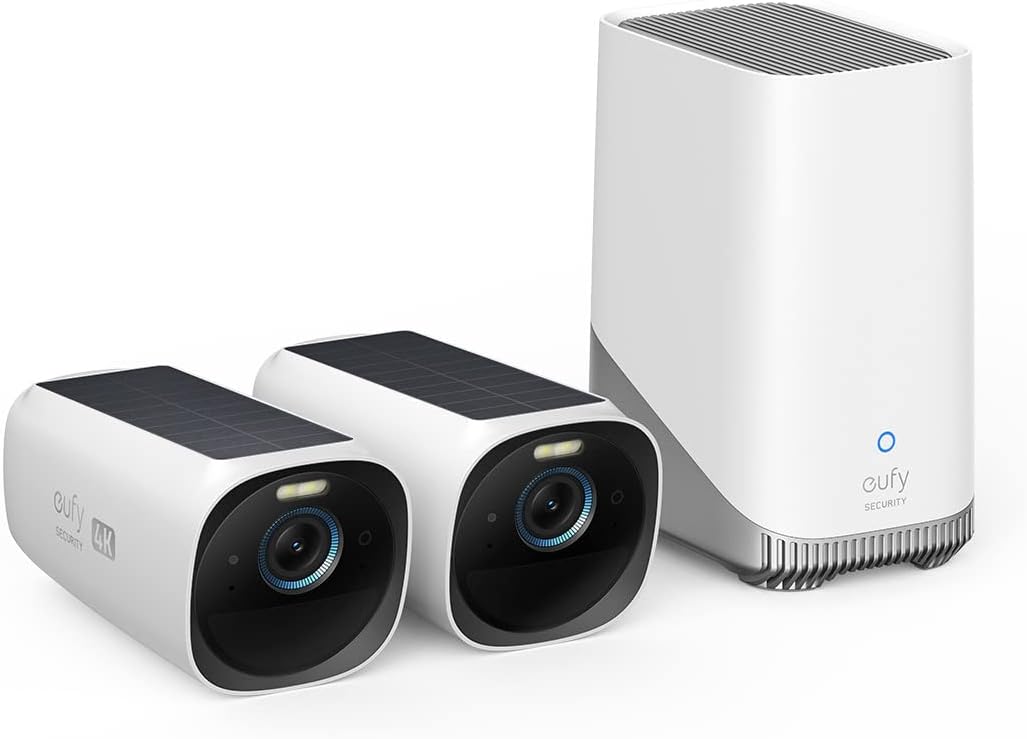 eufyCam S330 2-Cam KitBest solar battery kitCheck price on Amazon
- REOLINK Argus 3 Ultra Hub KitBest compact wire-free startCheck price on Amazon
 Arlo Essential 2K 3-CamEasiest installCheck price on Amazon
Prices move up and down on Amazon, so we never print a price here that could be stale by the time you read it. Use the price check button to see the current price.
The Best Security Camera Systems Under 500
The reviews that follow cover what can be checked before money changes hands: the box contents, the way each system records, and the costs of keeping and growing it.
REOLINK RLK8-510B4-A
This is the kit the rest of the guide is measured against, because it gets the fundamentals right in one box. Four wired cameras record at 2560 by 1920, sharp enough to read a face at the door, with an 80 degree view, a built-in microphone each, and infrared night vision out to 100 ft. Person and vehicle detection runs on the cameras, so alerts carry some judgement instead of pinging for every swaying branch.
Everything lands on the RLN8-410 recorder, which has PoE ports for eight cameras and a 2 TB drive installed. It records around the clock whether or not anyone is home, needs no subscription to do it, and the drive bay takes up to 12 TB when the included disk starts feeling small. A wired HDMI output means a cheap monitor or the family TV doubles as the viewing screen. Reolink backs the kit with a two-year limited warranty.
Buy it if you can run Ethernet cable and want the set-and-forget centre of this guide. Skip it if your home defeats cabling, because no app feature compensates for cameras you never manage to install.
Pros
- Four 5MP cameras with person and vehicle detection included
- Recorder fitted with a 2 TB drive and room for eight cameras
- Continuous recording with no monthly fee
- Drive can grow to 12 TB as storage needs rise
Cons
- Every camera needs an Ethernet run back to the recorder
- Infrared night pictures are black and white, with no spotlight colour mode
- Kit cameras are tied to the Reolink recorder ecosystem
eufyCam E330 4-Cam Kit
Most wire-free kits record clips when something moves. This one records all day and all night, because its four 4K cameras plug into mains power on 16.4 ft cables instead of living on batteries. That single design choice moves it out of the battery class and into direct competition with the wired recorders, without a single Ethernet run.
Footage collects on the HomeBase 3, a small hub with a 1 TB hard drive fitted inside. That drive holds up to ten days of continuous recording from all four cameras, and it can be swapped for a drive up to 16 TB. The hub runs up to ten of these cameras, links to each one over a range of up to 82 ft, and its tracking joins clips of the same person across cameras so an event reads as one story. Face recognition, a 100-lumen spotlight per camera and IP67 housings round it out, with a 12-month warranty.
Buy it if you want continuous recording and cannot face cabling, and your mounting points sit near sockets. Skip it if your cameras must live far from any power outlet.
Pros
- Continuous 24/7 recording from wire-free cameras
- 1 TB drive included, swappable up to 16 TB
- Cross-camera tracking stitches one event into a single review
- No monthly fee for recording or playback
Cons
- Each camera needs a mains socket within reach of its cable
- Cameras pair only through the HomeBase, so the hub is a single point of failure
- No Apple HomeKit support
ZOSI 8-Camera PoE System
Eight cameras change what a system is for. Instead of choosing which two doors matter, you cover the front, the back, both sides, the garage and the gate in the first install, and this is the only kit in the guide that puts eight in the box. The cameras are metal bullets with IP66 sealing, human and vehicle detection, and night vision rated to 120 ft, and eight 60 ft Ethernet cables are included to reach them.
One honest caveat shapes the whole review: the cameras record at 5MP, not 4K, whatever the system name suggests. The recorder outputs a 4K picture to a monitor, but the detail ceiling is the cameras' 5MP, still comfortably sharper than the 1080p sets this money used to buy. The fitted 2 TB drive works hard with eight feeds, helped by H.265+ compression, and the recorder stretches to 16 channels if you add a PoE switch later.
Buy it if your property has more angles than a four-camera kit can see. Skip it if fine detail at distance is the priority, because eight good pictures beat four slightly sharper ones only when coverage is the problem.
Pros
- Eight cameras in the box, the widest cover in this guide
- Metal IP66 camera housings with human and vehicle detection
- Recorder expandable to 16 channels with an added switch
- All eight camera cables included
Cons
- Cameras record 5MP despite the 4K system name
- Eight cable runs is a full weekend of install work
- The PoE switch needed for expansion is a separate purchase
Swann AdvancedX 4K
Where the ZOSI kit spends its budget on camera count, this one spends it on the sensor. The four bullet cameras record genuine 4K at 8MP, carry spotlights, and see in colour at night out to 50 ft, falling back to black-and-white infrared out to 100 ft. For reading a number plate on the drive or a face at the gate, that resolution is the difference between evidence and impression.
The recorder is an 8-channel unit with a 1 TB drive fitted, the smallest storage in this guide, expandable to 8 TB when it fills. Local recording needs no monthly fee; Swann also sells an optional Secure+ cloud backup for households that want clips held offsite as well. Smart video analytics sort people and vehicles from general motion, four 60 ft cables are in the box, and the whole package weighs about 11 lbs. Swann covers the system with a two-year limited warranty.
Buy it if identifying detail matters more than camera count. Skip it if you record around the clock from day one and dislike the idea of a drive upgrade in the first year.
Pros
- True 4K 8MP cameras, the sharpest wired pictures here
- Spotlight colour night vision to 50 ft
- No fee for local recording, with optional cloud backup on top
- Two-year limited warranty
Cons
- 1 TB drive is tight for four 4K cameras recording continuously
- Only four cameras in the box at this level of spend
- The best cloud features sit on the paid Secure+ tiers
Amcrest 5MP PoE System
Turret cameras are the grown-up choice for porches and soffits: the ball-and-socket eye aims anywhere, there is no dome to yellow or fog, and nothing dangles for a vandal to grab. Amcrest builds its four turrets in metal with IP67 sealing, each recording 2592 by 1944 at 30 frames per second with a built-in microphone and a starlight sensor that keeps low-light pictures usable after cheaper cameras have given up to noise.
The recorder is the NV4108E-A2, an 8-channel unit with eight PoE ports and a 2 TB surveillance drive fitted, swappable up to 10 TB. Four 60 ft cables are included, playback runs to 4K on a connected screen, and viewing away from home runs through the Amcrest View app. What you do not get is detection intelligence in the recorder itself: alerts here are motion based, and the smarter camera-side features belong to Amcrest's AI camera range rather than this kit.
Buy it if build quality and low-light pictures rank above smart alerts. Skip it if person and vehicle detection out of the box is a requirement rather than a nice extra.
Pros
- Metal turret cameras that aim precisely and shrug off weather
- Starlight sensors keep night pictures cleaner at 5MP
- 2 TB surveillance drive fitted, swappable up to 10 TB
- Eight PoE ports leave room to double the camera count
Cons
- No person or vehicle detection in this kit
- App experience is functional rather than polished
- Turret styling suits eaves and porches better than open walls
ZOSI Spotlight PoE System
Most kits in this guide watch quietly. This one argues back. When a person steps into view, its cameras can answer with bright spotlights and a siren, and two-way audio lets you speak to whoever is standing at the door through the app. For a driveway or a side path where deterrence matters more than discretion, that behaviour is the product.
The hardware underneath is a sound wired kit: four 5MP PoE cameras with a 95 degree view, colour and infrared night modes reaching 100 ft, and an 8-channel recorder with a 2 TB security-grade drive that records around the clock and overwrites the oldest footage when full. Person and vehicle detection feeds app and email alerts, four 60 ft cables are in the box, and the package weighs just over 13 lbs, which hints at how much hardware is inside.
Buy it if you want intruders to know they have been seen. Skip it if your cameras overlook neighbours at close quarters, because sirens and spotlights make enemies of the wrong audience.
Pros
- Spotlights, siren and two-way talk built into every camera
- Records around the clock to the fitted 2 TB drive
- Person and vehicle detection with app and email alerts
- IP66 cameras with colour and infrared night modes
Cons
- Deterrence features need careful aiming in dense streets
- Cameras record 5MP under a 4K recorder banner
- Recorder fan is audible in a quiet room
REOLINK Argus PT Ultra Kit
Two cameras that move can watch what four fixed ones would. Each camera in this kit turns through 355 degrees and tilts 140 degrees, follows movement across the yard on its own, and returns to a set watch point when the action passes. Mounted at a corner, one camera honestly replaces a pair of fixed units, and the 4K picture stays sharp while it turns.
Power comes from batteries topped up by the solar panels in the box, and both cameras talk to the Reolink Home Hub over dual-band Wi-Fi. The hub manages up to eight cameras, keeps footage encrypted on local storage with no monthly fee, and compiles daily, weekly and monthly summaries of events. The honest catch is that the hub's two microSD slots, taking cards up to 512 GB each, arrive empty: the cards are your first extra purchase. Recording is motion based, so this is a watcher, not an around-the-clock witness.
Buy it for wide yards and corners where one viewpoint has to do the work of two. Skip it if continuous recording is the whole point of upgrading.
Pros
- Pan and tilt movement with automatic tracking of subjects
- Solar panels included, so charging runs itself
- Hub stores up to eight cameras' footage with no monthly fee
- Dual-band Wi-Fi reaches both router generations
Cons
- microSD cards are not included in the box
- Motion-based recording only, nothing between events
- Two cameras is a start, not whole-house cover
eufyCam S330 2-Cam Kit
A two-camera kit earns its place here by being honest about what a pair can do: watch the front door and the driveway properly, in 4K, with no wires and no ladder work after the first sunny week. Each camera carries its own solar panel on top, and eufy rates a couple of hours of direct sun as covering a typical day of use, so in a decent spot the batteries look after themselves. The 135 degree view is the widest among the battery picks, and IP65 housings with spotlights and two-way audio complete a convincing door-and-drive pairing.
Everything records to the HomeBase 3, which arrives with 16 GB of storage inside and room for a hard drive up to 16 TB when you add one. Face recognition runs on the hub, there is no continuous recording on battery power, and Wi-Fi stops at the 2.4 GHz band. A 12-month warranty covers the kit.
Buy it if two viewpoints cover your home and you want the lowest-maintenance system here. Skip it if you already know you need four cameras, because growing this kit means buying more solar cameras at full price.
Pros
- Integrated solar panels end the charging routine
- 4K pictures with a wide 135 degree view
- Hub takes an added drive up to 16 TB
- Face recognition handled on the hub, not in a cloud
Cons
- Only 16 GB of storage until you buy a drive
- No continuous recording on battery power
- 2.4 GHz Wi-Fi only, no 5 GHz band
REOLINK Argus 3 Ultra Hub Kit
Two fixed cameras and a hub the size of a paperback: this is the smallest complete system in the guide, and the right shape for a first proper setup covering a door and a back garden. The cameras record in 4K with spotlight colour night vision, sort people, vehicles and animals in their detection, and connect over dual-band Wi-Fi, which keeps them happy on modern routers that battery kits with older radios struggle against.
Reolink puts the gap between charges at up to five months, and the hub stores footage locally with encryption, so nothing about recording depends on a subscription. Two things are deliberately not in the box: the cameras record events rather than running continuously, and no solar panels are included, though the cameras accept them as an add-on when a sunny mounting point makes charging feel like a chore. The hub also passes footage to network storage over RTSP, which gives tinkerers a second copy of everything.
Buy it as a tidy start you can grow to eight hub cameras. Skip it if your two viewpoints both need to move, because the pan-and-tilt kit above exists for exactly that.
Pros
- Compact two-camera system with genuine 4K pictures
- Dual-band Wi-Fi and person, vehicle and animal detection
- Encrypted local storage with no monthly fee
- Hub can feed footage to network storage as a backup
Cons
- Solar panels are a separate purchase
- Event recording only, no continuous option
- Fixed cameras cannot follow movement across a yard
Arlo Essential 2K 3-Cam
No recorder, no hub, no cables to speak of: three battery cameras, three wall mounts and a charging cable are the install, which is why this is the kit a renter or a DIYer will put up this weekend. The cameras record 2K video with an integrated spotlight, a siren, colour night vision and two-way audio, and its app is the most polished in this guide.
The trade is structural, and it is why this kit sits last rather than first. There is no local storage. A one-month trial of the Arlo Secure plan is included, and once it ends, the recognition of people, packages and vehicles, plus the saved video history, stop working unless the plan is paid for. Without it you keep live viewing and motion alerts, and lose the record. Nine picks here were chosen to avoid that dependency; this one earns its place because for some households the easy install is worth a running cost.
Buy it if it will actually be installed, where a wired kit would still be in its box in March. Skip it if a monthly fee for your own footage is a line you will not cross.
Pros
- Three cameras mounted in under an hour, no hub or recorder
- Spotlight, siren and colour night vision on every camera
- Polished app and tidy animated alert previews
- Mounts, screws, charging cable and security decal all included
Cons
- No local storage option in this kit
- Recognition features and video history stop when the trial ends without a plan
- Batteries need manual charging on a cable
Wired PoE With a Recorder or Wire-Free With a Hub
Every kit in this guide belongs to one of two families, and the family matters more than any single specification inside it. A wired PoE system runs an Ethernet cable to every camera. That cable carries power and video together, and everything records to a hard drive inside a recorder box that sits near your router or TV and never sleeps. A wire-free kit puts its cameras on batteries, solar panels or a short mains lead, and sends footage over Wi-Fi to a small hub, or in the Arlo's case to the cloud. The install is measured in minutes and the recording is built around motion.
| Point of difference | Wired PoE system with NVR | Wire-free battery or WiFi kit |
|---|---|---|
| Recording pattern | Around the clock to a fitted hard drive | Motion-triggered clips, unless the cameras plug into mains power |
| Power to each camera | One Ethernet cable carries power and video | Batteries, solar top-up, or a mains cable near each camera |
| Storage in the box | Hard drive fitted, 1 TB to 2 TB | 16 GB of hub memory, card slots, or cloud only |
| Monthly fee to keep recordings | None for local recording | None for hub storage; the Arlo kit's recognition needs a paid plan |
| Setup work | Cable runs to every camera, recorder placed indoors | Cameras up in minutes, hub indoors near the router |
| Room to grow | Eight recorder channels, sixteen on one ZOSI with a switch | Eight cameras on a Reolink Home Hub, ten on eufy's HomeBase 3 |
| Night picture | Infrared black and white on most, spotlights on some | Spotlight colour night vision is common |
Choose wired PoE if a monthly recording bill is the thing you are trying to escape. The Reolink, Amcrest and Swann recorders and both ZOSI kits record everything to a drive you own, they keep recording if the broadband drops, and the footage stays in the house. The price of that independence is a weekend of cable runs.
Choose wired PoE if your property is large and an incident might unfold slowly: a vehicle moving through a yard, someone testing doors over ten minutes. Continuous recording catches the approach and the departure, not just the loudest second. The eight-camera ZOSI exists for exactly this reader.
Choose wire-free if drilling and cabling are off the table, because you rent, because the walls are stone, or because the system has to be up before the weekend is. The Reolink hub kits and the eufyCam S330 go up with screws and a phone, and their batteries and solar panels ask for attention a few times a year at most.
Choose wire-free if two or three viewpoints honestly cover your home. Small houses gain nothing from a recorder with eight channels, and the hub kits are cheaper to grow one camera at a time.
One kit breaks the pattern and deserves a sentence of its own. The eufyCam E330 belongs fully to neither family: no Ethernet cables anywhere, yet recording runs around the clock, since each camera draws mains power rather than living on a battery. If the recorder family's recording style is what you want and the hub family's install is what you can manage, it is the bridge between the two.
Also considered
- REOLINK RLK8-800B4: a well-proven 4K wired kit with a 2 TB drive, but its street price at research time could not be confirmed inside this budget, with records pointing both sides of the line.
- Amcrest 4K Turret System: the sharper sibling of our fifth pick, with the same metal build, priced above this guide's ceiling in Amcrest's own store.
- Lorex 4K NVR systems: capable wired systems with strong deterrence lighting, but no 4K kit from the line could be verified under the cap, and its Fusion range sits well above it.
- GW Security 4K PoE systems: installer-grade hardware with deep configuration, priced like it, with representative kits costing more than double this budget.
- Blink Outdoor 4: bundles fit the money, but 1080p motion clips with no drive in the box belong to a cheaper tier than the systems this guide is about.
Who this guide is for
You want the whole house covered and no monthly bill
Every door, the drive and the garden watched by one system, with the footage sitting on a drive in your own hall cupboard. The wired recorders and the two Reolink hub kits were chosen with you first in mind.
Your property is large and short clips are not enough
A long drive, outbuildings, a yard where things happen slowly. You need recording that runs through the night rather than waking for motion, which points you at the recorder kits and the plug-in eufy system, in that order.
Your first cheap set missed the moment that mattered
A single bargain camera taught you that resolution, recording pattern and storage decide whether footage helps afterwards. This guide is the deliberate upgrade: verified systems, honest storage figures, and no pick that hides its running costs.
What to look for when buying a security camera system
- Decide the recording pattern before anything else. Around-the-clock recording and motion clips are different products wearing the same name. If you would be angry about a gap in the footage, only a recorder kit or a mains-powered wire-free kit belongs on your list.
- Read the drive size, not just the camera count. One terabyte disappears in days under four 4K cameras recording continuously, while a 2 TB drive gives you weeks. A swappable drive bay is worth more over five years than one extra camera today.
- Follow the power. PoE cables mean a bigger install and zero charging forever. Batteries mean an easy install and a charging routine, unless solar panels are included or your mounting points sit in honest sunlight.
- Ask what the detection costs. Person, vehicle and package recognition is sometimes a camera feature and sometimes a subscription feature. The Arlo kit in this guide is the open example of the second kind; check any kit you shortlist for the same catch.
- Check the box weight and the returns path before you mount anything. Recorder kits arrive at 11 to 13 lbs with a nest of cables. Power the whole system up on a table first, because a kit with holes drilled for it is a kit you own.
Sizes, fit and space for a security camera system
Four cameras suit most houses: front door, back door, driveway and the side gate or garden. Eight cameras earn their install time on larger plots, long boundaries and homes with outbuildings, where blind corners are the actual problem. Two-camera hub kits fit flats, small houses and anyone covering an entrance plus one vulnerable window.
Cable length shapes wired installs more than camera choice does. The wired kits here include 60 ft of Ethernet cable per camera, so measure your runs, including the climb to the eaves and the drop to the recorder, before you commit. The recorder itself wants a ventilated spot near the router with a screen in reach; a hall cupboard works well, a hot loft shortens a hard drive's life, and the fan rules it out of a bedroom.
Wire-free kits trade cables for range. eufy's hub talks to its plug-in cameras up to about 82 ft away, and every hub kit works best with the hub indoors, roughly central, near the router. The E330's cameras also need a mains socket within 16.4 ft of each mounting point unless you buy the longer cables. Battery cameras want a reachable height, because a camera you cannot reach is a camera that goes flat and stays flat.
What security camera systems at this level cost to own
The headline ownership fact of this budget is that recording itself is free on nine of these ten systems. The wired recorders write to their own drives, the hub kits write to storage in the house, and nothing about keeping that footage depends on a subscription surviving. The Arlo kit is the exception by design: when its trial ends, the recognition features and the video history stop, and what remains is live viewing and basic alerts. Nothing about the local kits changes if you never pay anyone a cent.
Storage depth is the second cost, paid in days rather than money. The E330's 1 TB drive holds up to ten days of continuous recording from its four 4K cameras. The wired kits' 2 TB drives hold roughly twelve days of always-on footage from eight 5MP cameras, and around three weeks from four, before the oldest recordings are overwritten. Households that need a longer memory pay once, in hardware: the Reolink recorder accepts drives up to 12 TB, the Amcrest up to 10 TB, the Swann up to 8 TB, and eufy's hub takes a swap up to 16 TB.
Growth costs money in predictable places. Add-on cameras are the big one, a PoE switch is needed before the eight-camera ZOSI grows past its recorder's ports, the Argus PT hub arrives without the microSD cards it records to, and the Argus 3 Ultra kit treats solar panels as an extra. None of these are traps; all of them belong in the budget conversation before the first kit is bought.
Two risks deserve plain words. The first is dependence on an app and a maker's cloud for remote viewing: if a maker ever shut its service down, the recorder and hub kits in this guide would keep recording to the drive in your house, and it is the phone access that would narrow. The second is privacy. Footage of your own home deserves the same hygiene as a bank account: encryption on the hub kits helps, and strong unique passwords, current firmware and careful remote access settings matter, which is why the FTC's guidance on securing home security cameras is worth ten minutes of any buyer's time.
Warranties differ more than the marketing suggests. The recorder brands stand behind their kits for two years, which is where Reolink's support centre earns its keep for the two Reolink wired and hub systems' owners, while eufy covers its camera kits for twelve months. On a product expected to live on a wall for five years, that gap is a real part of the price.
Common mistakes when buying a security camera system
- Counting cameras before checking the recording pattern. Eight cameras that only wake for motion can still miss the start of the one event you bought them for.
- Drilling first and testing second. Bench-test every camera and the recorder on a table before a single hole is made. A wired kit with cables run and brackets screwed up is miserable to return, and its 11 to 13 lbs box is no fun to post back either.
- Assuming the drive remembers everything. Included drives overwrite their oldest footage on a cycle measured in days or weeks. Save the clip that matters somewhere else the day it happens.
- Hiding the recorder or hub where signals and air cannot reach. A hub in a far corner starves wire-free cameras of signal, and a recorder in a sealed, hot cupboard cooks the drive that holds your evidence.
- Skipping the safety and security basics. Run any system you are considering through the CPSC recall database before buying, change every default password during setup, and turn on automatic firmware updates the same day.
Security camera system pros and cons
Pros
- Whole-property cover in one purchase, with cameras matched to one recorder or hub
- Local recording at this level carries no monthly fee on nine of the ten picks
- Around-the-clock recording is available well inside the budget
- Systems grow: spare recorder channels, hub camera limits and swappable drives all leave headroom
Cons
- Wired kits demand a serious install, and unwired kits demand charging or sunlight
- Included storage is finite, and longer memories cost extra hardware
- Every system here leans on a phone app for alerts and remote viewing
- A stolen recorder or hub can take the footage with it, since most recording stays in the house
Who should not buy a security camera system at this level
If one doorway is all that worries you, a single camera answers it for a fraction of this budget, and a ten-box system is money spent on views you will never watch. If you want another human being to respond when an alarm sounds at 3 a.m., none of these systems does that either; they record and alert, and the responding is yours. And if your home's internet connection is unreliable and offsite backup is the whole point, look at monitored services instead, because this budget's strength is exactly the opposite idea: everything kept at home.
Best Security Camera System Under 500: Frequently Asked Questions
Can a security camera system under $500 record without a monthly subscription?
Yes, and most of this guide is proof. Every wired recorder kit and every hub kit here records to storage inside your home with no fee at all. The Arlo kit is the exception: its recognition features and video history need a paid plan once the included trial ends.
How many cameras does a system under $500 usually include?
Four is the common count at this level, with wired kits adding a recorder and wire-free kits adding a hub around them. The count stretches to eight in the largest wired kit here and drops to two in the compact hub kits, which suit smaller homes.
How much footage does the hard drive in an under-$500 system hold?
The eufy hub's 1 TB drive holds up to ten days of continuous recording from four 4K cameras. A 2 TB drive in a wired kit holds roughly twelve days of always-on footage from eight cameras and about three weeks from four, after which the oldest footage is overwritten.
Is wired PoE or wireless better for a system under $500?
Wired PoE is better for continuous recording, zero charging and footage that stays in the house, at the cost of a real installation. Wireless is better when drilling is impossible or the system must go up fast, and it records motion clips rather than everything. The plug-in eufy kit is the middle path, recording continuously without Ethernet cables.
What else will I need to buy after an under-$500 camera system?
Possibly nothing, but the common extras are a larger hard drive, a monitor for the recorder, longer or additional cables, microSD cards for the hub kit that ships without them, and solar panels for the battery kit that treats them as an add-on. Add-on cameras are the other predictable spend as blind spots reveal themselves.
Keep researching
A camera system is the centre of a smarter, safer home rather than the whole of it. Start from the security camera systems hub to see every camera guide we publish, or browse the wider Smart Home hub for the alarms, locks and lighting that work alongside one.
More in Smart Home: browse the full Smart Home hub for the rest of our smart home guides.
How we check security camera systems like these
Read the full Pick Hearth methodology- We check every kit's premise, camera count, storage and price band against the manufacturer's own figures and its Amazon listing before it earns a place.
- Recording limits, drive capacities and detection behaviour are taken from manufacturer documents, including the honest limits, not from headline marketing.
- No brand can pay for a place in this guide, and affiliate earnings never change the order of the picks.
First published · Updated in place as products and specs change