Our top picks at a glance
Here is the honest shape of this budget. It buys a real video doorbell, not a toy: 2K pictures, head-to-toe views and recordings that stay inside your own home are all normal at this level. What it asks in return is one decision, about storage. Seven of these ten doorbells record to a memory card and never bill you again. The three famous names, Ring, Arlo and Blink, keep their recordings behind subscriptions, and no discount at the till changes that afterwards.
What the band does not buy is stamina or spectacle. Nothing here records around the clock on battery power, the second package cameras of the flagship models are absent, and every pick speaks 2.4 GHz Wi-Fi only. Battery figures are laboratory numbers, too: a quiet door gets months from a charge, while a busy shared hallway gets weeks.
The Tapo D210 leads because it is the complete renter's kit in one box: adhesive and screws, a chime, colour night vision and free local recording. If parcels are the worry, look at the head-to-toe picks, the D225, the Wyze and the aosu V8E. If a subscription is the one thing you refuse, stay with the seven local-storage models and let the famous names go.
 Tapo 2K Wireless Smart Video Doorbell with Chime, D210Best overallCheck price on Amazon
 Tapo Smart Video Doorbell Camera with Chime, D225Best head-to-toe viewCheck price on Amazon
 Wyze Battery Video DoorbellBest if you may hardwire laterCheck price on Amazon
 eufy Security Video Doorbell Camera C30Best wide view without a subscriptionCheck price on Amazon
 aosu Doorbell Camera Wireless, V8EBest for parcels with a chime includedCheck price on Amazon
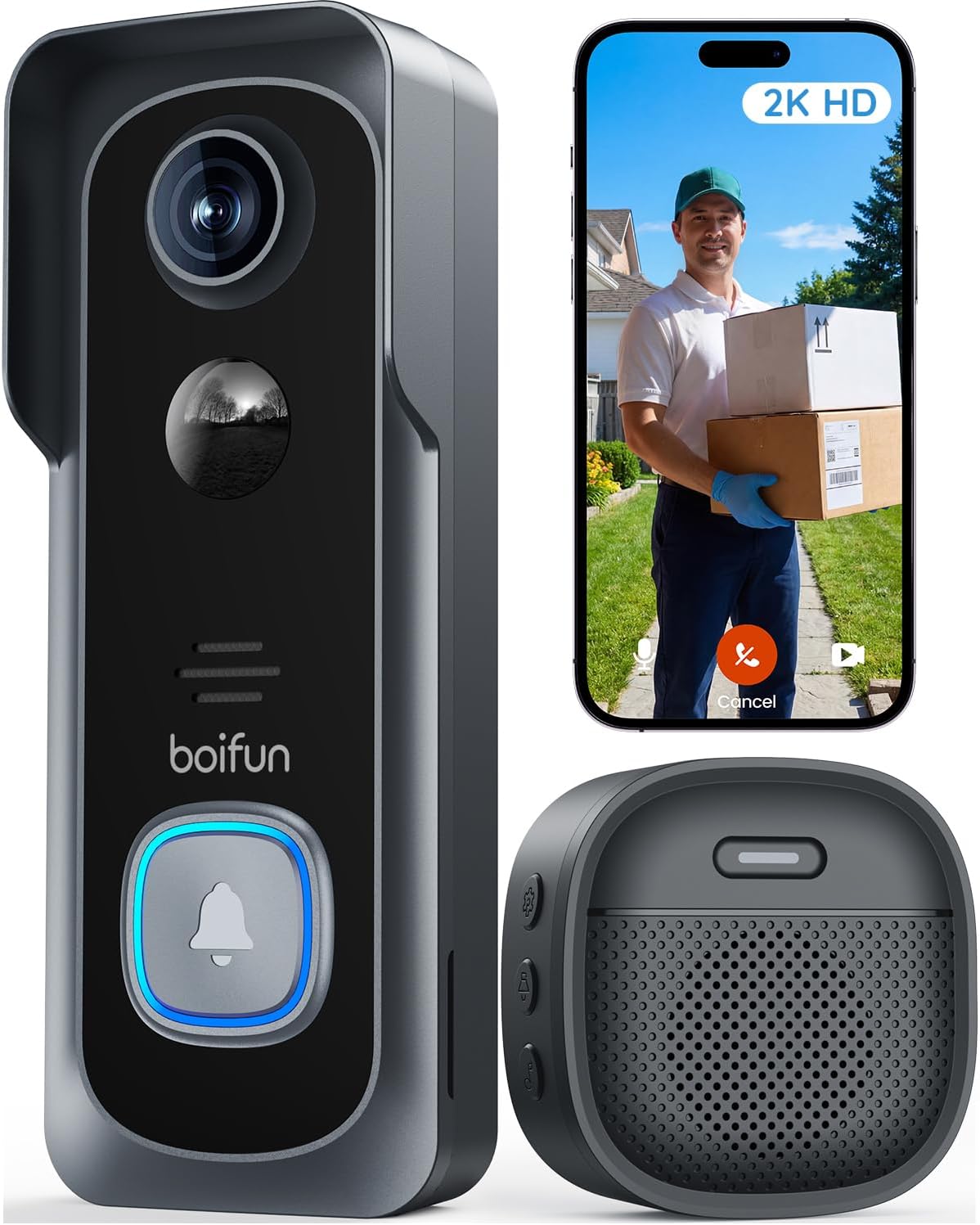 BOIFUN Video Doorbell Camera Wireless, J1Best no-drill fitting with a chimeCheck price on Amazon
 XTU Doorbell Camera Wireless, J10Best angled bracket on a budgetCheck price on Amazon
 Arlo Essential Video Doorbell Wire-Free, AVD2001Best 180° view from a big brandCheck price on Amazon
 Blink Video Doorbell (1st Gen)Best for battery lifeCheck price on Amazon
 Ring Battery Doorbell (2024 release)Best for Alexa homesCheck price on Amazon
Prices move up and down on Amazon, so we never print a price here that could be stale by the time you read it. Use the price check button to see the current price.
The Best Video Doorbells Under 100
Every review below sticks to what can be verified from the manufacturer's listing and documents: power, fitting, resolution, view, night vision, storage, chime and weather rating.
Tapo 2K Wireless Smart Video Doorbell with Chime, D210
The D210 is the pick that asks the fewest compromises of a renter. The box carries both a 3M adhesive pad and screws with anchors, so the fitting can be drill-free on a smooth frame or permanent where the lease allows, and a horizontal wedge angles the 160° view across a porch instead of straight out. Video is 2K, night footage is in colour under its own spotlights, and recordings go to a microSD card with person detection running free, so no plan is needed to keep the doorbell useful. The plug-in chime means a press is heard in the hall, not only on a phone. Buy it if you want the complete kit in one box. Skip it if your door faces a busy street, because the six-month battery figure assumes a calmer doorstep.
Pros
- Adhesive pad and screws both in the box, with a wedge for angled doors
- 2K video with colour night vision from its own spotlights
- Local recording and person detection with no subscription
- Plug-in chime included, plus an anti-theft alarm
Cons
- microSD card sold separately
- 2.4 GHz Wi-Fi only
- Battery figure assumes moderate motion; busy doors charge sooner
Tapo Smart Video Doorbell Camera with Chime, D225
Where the D210 is the all-rounder, the D225 is the view specialist. Its 180° diagonal lens is framed head-to-toe, so a visitor's face and the parcel at their feet share one picture, in 2K QHD with colour night vision from a built-in spotlight. The 10,000 mAh battery is the largest in this guide and is rated up to eight months, and the box again carries both a 3M adhesive pad and screws, so the fitting can be as gentle as the lease demands. Detection is the generous part: person, package and vehicle alerts run free, and recordings stay on a microSD card unless you choose the optional cloud. Buy it for a doorstep where parcels matter. Skip it if the doorway is ordinary and the smaller D210 covers it, leaving the change for the memory card.
Pros
- 180° diagonal lens framed from head to toe
- 10,000 mAh battery rated up to eight months
- Person, package and vehicle detection free, with local recording
- Adhesive pad or screws, and a chime in the box
Cons
- microSD card sold separately
- Built-in battery, so the whole unit comes off the bracket to charge
- 2.4 GHz Wi-Fi only
Wyze Battery Video Doorbell
Wyze frames its picture as a square, 1536 by 1536 and head-to-toe, so a tall visitor and a low parcel both fit without the stretched edges of a wide landscape view, and colour night vision comes from a starlight sensor rather than a spotlight. Recordings sit on a microSD card with no plan; the paid Cam Plus tier adds cloud history and labels for people, vehicles and packages, and continuous recording only arrives if the doorbell is hardwired later, which is why this is the pick for a renter who may own the next door. The fitting is screws only, on a flat or corner plate. Buy it for a narrow porch. Skip it if you need a chime in the box.
Pros
- Square 1:1 picture framed from head to toe suits narrow porches
- Local recording to microSD with no plan required
- Corner back plate included for angled doors
- USB-C charging, up to six months per charge
Cons
- Screws only; no adhesive option in the box
- No chime included
- Continuous recording needs a hardwire this guide assumes you cannot run
eufy Security Video Doorbell Camera C30
The C30 is eufy's simple answer to the renter problem: a battery-only doorbell, with no wired mode at all, that records to a microSD card and never asks for a monthly fee. Its 165° view is a wide 16:9 landscape, good for a door set in a broad wall or a porch that spreads sideways, and a press starts a live video call on your phone rather than a plain notification. Human detection runs without a plan, and a HomeBase S380 can join later if the home grows into a wider system. The fitting is screws with a 15° wedge, and the unit locks to its bracket behind a release pin. Buy it if a subscription is the thing you refuse to pay. Skip it if someone in the house needs to hear a physical chime.
Pros
- No monthly fee: local recording and human detection included
- 165° wide view in 2K FHD
- Live video call on a press, with quick responses
- Battery only, so there is no wiring question to settle
Cons
- No chime in the box and no support for an existing chime
- Screws only; no adhesive fitting
- microSD card sold separately
aosu Doorbell Camera Wireless, V8E
The V8E pairs one of the widest views here, 170° in a tall 9:16 frame, with the two features renters ask about most: a plug-in chime in the box, and package detection that does not sit behind a subscription. Recordings go to a local microSD card, with cloud storage offered as an option rather than a requirement. Read the battery claim on its own terms: up to 120 days, calculated on thirty short videos a day in laboratory conditions, so a busy shared hallway will land well short of it. Fitting is a screw-mounted bracket, with no adhesive route in the box. Buy it for parcel-heavy doorsteps where the frame may be drilled. Skip it if the lease rules out screws entirely.
Pros
- 170° view framed from head to toe with package detection included free
- Plug-in chime in the box
- Local storage with no monthly fee
- USB-C charging
Cons
- Screw fitting only, no adhesive in the box
- Battery figure is a laboratory best case
- microSD card sold separately
BOIFUN Video Doorbell Camera Wireless, J1
The J1 is built around the renter's fitting problem. The box carries double-sided adhesive tape for a drill-free mount on a smooth surface and the screws and tools for a permanent one, so the same kit serves a strict lease and a relaxed one. An indoor chime is included, and the essential features, alerts, two-way audio, human detection and playback from a microSD card, all run with no subscription; paying only adds cloud storage and richer AI event labels. Video is 2K with a 166° view and HDR infrared night vision, and a tamper alarm reports a forced removal. Buy it if you want a chime and a no-drill option at the low end of the band. Skip it if you want a battery that outlasts a season, because sixty days is one of the shortest figures here.
Pros
- Adhesive tape and screws both in the box
- Indoor chime included
- Essential features and local playback need no subscription
- 166° view with HDR night vision and a tamper alarm
Cons
- Battery sealed in the unit; the whole doorbell comes down to charge
- Up to 60 days per charge (laboratory figure)
- Subscription needed for cloud storage and enhanced AI labels
XTU Doorbell Camera Wireless, J10
The J10 is the low-cost kit that still thinks about angles. Its multi-angle bracket tilts the doorbell across five positions up to 45 degrees, which rescues doors set at an angle to the path, and the box carries heavy-duty adhesive strips for a no-drill fitting as well as a screw kit. A wireless chime is included. Recordings stay local on a microSD card, with free six-second cloud clips as a small backup; longer cloud history is the paid part. The compromises are the view, the narrowest in this guide at 120°, and a battery quoted at about two months. Buy it for an angled doorway on the tightest budget. Skip it if your doorstep is wide, because 120° leaves the edges unwatched.
Pros
- Multi-angle bracket, plus adhesive strips and screws in the box
- Wireless chime included
- Local recording with no subscription; free short cloud clips
- Human detection and two-way audio
Cons
- 120° field of view, the narrowest here
- About two months per charge at 20 daily triggers
- 2.4 GHz Wi-Fi only
Arlo Essential Video Doorbell Wire-Free, AVD2001
The Essential is the polished big-brand option in this band, and its view leads the guide on paper: 180° diagonal in a square frame with HDR, so faces and parcels share one tall picture. Its battery pack is removable, which makes charging the easiest here, because the pack comes indoors and the doorbell stays mounted. Fitting is screws on a flat or angled plate, and the doorbell can also be hardwired. The catch is storage. There is no local recording at all: live view is free, but saved video and the smart person, package and vehicle alerts need an Arlo Secure plan once the included trial ends. Buy it if the view matters most and a plan is acceptable. Skip it if the point of the budget is avoiding subscriptions.
Pros
- 180° square view with HDR and from head to toe framing
- Removable battery pack charges away from the door
- Flat and angled mounting plates included
- Connects directly to Wi-Fi, no hub needed
Cons
- No local storage; recordings need an Arlo Secure plan
- No chime in the box
- Black and white night vision where rivals offer colour
Blink Video Doorbell (1st Gen)
The first Blink doorbell trades sharpness for stamina. Video is 1080p, the plainest picture in this guide, but the two AA lithium batteries are quoted at up to two years of life when the doorbell works with a Sync Module, which turns battery care from a monthly chore into a rare one. That makes it the natural pick for a hard-to-reach door, or for elderly parents whose doorbell nobody wants to maintain. The trade-offs sit in storage and alerts: the doorbell itself stores nothing, so clips need a Blink plan or a Sync Module 2 with a USB drive, and person detection is a plan feature. Buy it if battery life beats picture detail. Skip it if you want recordings with no plan and no extra module.
Pros
- Up to two years on two AA lithium batteries with a Sync Module
- Simple, proven first-generation hardware
- Works with Alexa, and a Blink Mini can serve as a chime
- IP54 weather resistance for outdoor doors
Cons
- 1080p video, the lowest resolution here
- No storage on the doorbell itself; clips need a plan or a Sync Module 2
- Person detection is a subscription feature
Ring Battery Doorbell (2024 release)
Ring's battery doorbell is the default choice in Alexa households, for practical reasons: announcements on Echo speakers, a mature app, and a square 1440 by 1440 picture with colour night vision that shows a visitor head-to-toe. The built-in battery charges by USB-C with the whole unit lifted off its bracket, and the fitting is screws. What Ring does not give you is a recording without payment. Live View and motion alerts are free, but saved video and the person and package Smart Alerts sit behind a Ring subscription, and there is no local storage and no chime in the box. Buy it if your home already runs on Alexa and a plan is a cost you accept. Skip it if avoiding subscriptions is the point of shopping in this guide.
Pros
- Square picture framed from head to toe with colour night vision
- Alexa announcements and a polished app
- USB-C charging, with hardwiring possible later
- Operating range covers hard winters, -4°F to 122°F
Cons
- No local storage; recordings need a Ring subscription
- Person and package alerts sit behind the plan
- No chime in the box
What the Budget Does and Does Not Buy
Cheap video doorbell versus expensive video doorbell, the real differences are narrower than the marketing suggests, and wider in two places that matter. On picture, a well-chosen budget model is genuinely close: most of this guide shoots 2K or a square head-to-toe picture, and parcels are as visible here as on models well above the band. On recording stamina and free cloud history, the gap is real and no buying trick closes it.
| Point of difference | What the budget buys in this guide | What it does not buy |
|---|---|---|
| Video | 2K on six picks, square head to toe HD+ pictures on three more | 4K sensors and a second, dedicated package camera |
| Recording | Motion-event clips on every pick | 24/7 continuous recording on battery power |
| Storage | Local microSD recording with no subscription on seven picks | Free cloud history from Ring, Arlo or Blink; their recordings sit behind plans |
| Detection | Free person detection on most picks; package and vehicle detection free on the D225 | Facial recognition and familiar-face alerts |
| Sounding the bell | A plug-in or wireless chime inside five of the ten boxes | A chime in every box; Ring, Blink and Arlo sell theirs separately |
| Battery | Up to eight months on the D225, up to two years on the Blink | Freedom from charging duty on the sealed-battery models |
| Wi-Fi | 2.4 GHz on every pick | Dual-band 5 GHz Wi-Fi |
One boundary is worth knowing before you spend anything: a doorbell watches the doorway and answers the knock, and it does not watch the back garden or the hall. Our Video Doorbell vs Security Camera guide covers which device owns which job, and when a home wants one of each. Inside this budget, the decision rule is storage first, fitting second: decide whether you will pay a plan, then choose the mount your lease allows.
Also considered
eufy Security Video Doorbell E340 (B0CD7NT4Y9). The lead pick of our apartment guide, with dual cameras and 8GB of storage inside the doorbell, but its featured listing sat above this budget band when we checked, so it cannot hold a place in a guide defined by the band.
Wyze Duo Cam Doorbell (B0DCJB43TH). Another apartment-guide pick, with a second camera aimed at the doormat, held out for the same reason: its listing sat above the band at research time.
Ring Video Doorbell Wired (B08CKHPP52). The cheapest way into the Ring app, but it is hardwired only, with no battery at all, so it fails this guide's premise outright.
Google Nest Doorbell (Wired, 2nd Gen) (B0BBSLG6PC). Held out on the same premise: a wired-only model cannot serve a renter who is forbidden to wire, whatever its picture quality.
EZVIZ DB2 (B09FJMLJW4). Strong on paper, with a battery and a chime, but it is sold for the UK market; the US store carries the DB1C instead, above the band, so there was no clean in-band US listing to recommend.
Who this guide is for
Elderly parents
A doorbell for a parent's house has to be heard, not just seen. The picks with a chime in the box, the two Tapo models, the aosu, the BOIFUN and the XTU, ring in the hallway like a normal bell, while the Ring, Blink, Arlo and eufy picks announce only through a phone or a smart speaker. The eufy C30's live video call suits a parent who finds apps fiddly, and the Blink's two-year battery removes the maintenance visits almost entirely.
Pet owners
A dog working the front window can drain a battery and fill a memory card with nothing. The local-storage picks with free human or person detection, the Tapo pair, the eufy, the aosu, the BOIFUN and the XTU, aim their alerts at people rather than movement in general, and the D210 adds custom activity zones so the lens can ignore the pavement. Two-way audio on every pick lets you settle a barking dog or speak to a walker at the gate from work.
Small apartments
In a small flat the door is close, the hallway is shared and the lease is strict. The adhesive fittings on the D210, D225, BOIFUN and XTU leave the frame untouched and come away clean when you move, and every pick here runs from the flat's own Wi-Fi with no hub to house. Check the building's rules on cameras in shared corridors before fitting anything, because that rule, not the technology, decides what is allowed outside your own door.
What to look for when buying a video doorbell under 100
- Where the recordings live: This is the decision that outlasts the purchase. Seven picks here record to a microSD card with no subscription; Ring, Arlo and Blink record only behind a plan, Blink alternatively to a Sync Module 2. Choose the storage model first and the brand second.
- The fitting in the box, not in the headline: Adhesive pads suit smooth frames and strict leases, screws hold on anything, and wedges and corner plates rescue doors at an angle. Four picks here include an adhesive route; the rest are screws only, and the cards say which is which.
- The shape of the view: A square or tall head-to-toe picture shows parcels at the door base; a wide landscape view shows more of the porch and less of the doormat. Match the shape to what you actually need to see, a face, a parcel, or both.
- A battery figure with its basis attached: Makers quote laboratory numbers at set trigger counts, from about two months to two years across this guide. A busy door lands far below every figure, so treat the quoted basis, triggers per day and clip length, as part of the spec.
- What the subscription actually buys: On the local-storage picks a plan buys cloud backup and richer labels; on Ring, Arlo and Blink it buys the recordings themselves. Our How to Choose a Video Doorbell guide walks through the full feature list behind these points.
Fitting and door types: adhesive, screws and wedges
Adhesive is the fitting this guide exists for, and it has one condition: the surface. The 3M pads in the Tapo boxes and the tape and strips in the BOIFUN and XTU boxes grip smooth, clean, dry surfaces, painted wood, uPVC and metal frames. On rough render, crumbly paint or exposed brick, adhesive lets go, and screws are the honest answer wherever the lease allows them.
Angle is the second problem. A doorbell looks where it points, and doors set at an angle to the path point at the neighbour's wall. The D210's horizontal wedge, the eufy C30's 15° wedge, the Wyze's corner back plate, the XTU's multi-angle bracket and the Arlo's angled plate all exist to turn the lens back toward the visitor, and they matter more than small differences in resolution.
Theft is the third. Battery doorbells unclip for charging, which means they can also be unclipped by someone else. The Tapo D210 and the BOIFUN J1 answer with tamper alarms, the eufy locks behind a release pin, and a screw fitting everywhere raises the effort. In a shared hallway, an anti-theft mount or a screw fitting is worth more than another increment of picture quality.
How much does a good video doorbell cost
No prices are printed in this guide, because they change too often to stay honest. What drives cost inside this band is consistent: the sensor and the shape of the view, the storage model, whether a chime is in the box, and battery size. The running costs are just as consistent. Every local-storage pick needs a microSD card, bought once. The subscription picks bill monthly or yearly for as long as you want recordings. The Blink needs replacement AA lithium cells, rarely. The sealed-battery models need nothing but charging time.
Below this band, you mostly give up the recording itself: the very cheap doorbells in our research leaned on seconds-long free cloud clips or 1080p pictures with narrow views. Above this band, you buy dual cameras, bigger batteries, HomeBase-style hubs and, on wired models, continuous recording. Expect the hardware in this guide to serve for years; the part that ages first is the battery on a busy door, which is why the running-cost question matters more than the ticket. If spending more is a real option, Best Video Doorbell for Apartments is the guide that follows the quality rather than the band.
Common mistakes when buying a video doorbell under 100
- Assuming the famous names record for free: Ring, Arlo and Blink show live view without charge, but their recordings sit behind subscriptions. Readers who miss this own a doorbell that remembers nothing.
- Drilling before reading the lease: Four picks here fit with adhesive and leave no trace. Check what your agreement allows before the drill comes out, and check the surface before trusting tape to it.
- Forgetting the memory card: Every local-storage pick in this guide ships without one, so the doorbell arrives unable to record until a card goes in. Order both together.
- Ignoring the 2.4 GHz limit: Every pick here is 2.4 GHz only. That band reaches a front door well, but a router set to 5 GHz only, or a door beyond the signal's reach, stops any of them working.
- Letting the battery die quietly: A flat doorbell records nothing and rings nothing, and the sealed units need the whole doorbell brought inside to charge. The swapping and charging routines in How to Change Video Doorbell Battery keep a battery doorbell covered while it charges.
Video doorbell pros and cons
Pros
- Every pick fits without wiring and comes back off when you move
- 2K video and head-to-toe views are common at this band, not flagship extras
- Seven of the ten record locally with no subscription
- A chime is included in half the boxes here
Cons
- No battery doorbell here records around the clock
- Ring, Arlo and Blink keep their recordings behind subscriptions
- Every pick is 2.4 GHz Wi-Fi only
- Battery figures are laboratory best cases; busy doors charge far sooner
Who should not buy a video doorbell under 100
Skip this band if you want continuous recording, because no battery doorbell does it and the one pick that unlocks it, the Wyze, does so only when hardwired, which is the fitting this guide assumes you cannot use. Skip it, too, if your doorway sits beyond your Wi-Fi's reach, since every pick here is a Wi-Fi device with no wired data option, or if you want a traditional wired chime and doorbell circuit replaced like for like: that is a wired installation, and a different guide.
Best Video Doorbell Under $100: Frequently Asked Questions
Is a cheap video doorbell worth it under 100?
Yes, if the listing itself stands behind the basics, as every pick in this guide does: battery power, a fitting that needs no wiring, and a stated place where recordings live. In this band you can buy 2K video, head-to-toe views, colour night vision and free local recording. What you are not buying is stamina: if the doorbell will work a busy door for years, the charging routine and the storage model matter more than the ticket.
What do you give up with a budget video doorbell?
Mainly four things: continuous recording, which no battery model here offers; a second package camera, which lives on the flagship models above the band; free cloud history from the big brands, whose recordings sit behind plans; and refinement, in the form of dual-band Wi-Fi, facial recognition and the largest batteries, though the D225's eight-month cell shows the band closing on that last one.
What video doorbell features do you still get under 100?
More than the price suggests. This guide alone includes 2K video on six models, 180° views on two, package detection with no fee on three, chimes in five boxes, adhesive fittings in four, and local recording with no subscription on seven. The features that disappear first are continuous recording, dual cameras and familiar-face recognition.
How do you spot a bad cheap video doorbell?
Look for what the listing avoids. No stated battery size or basis for the battery claim, a headline resolution with no field of view, storage described only as cloud with no word on what the free tier holds, no weather rating, and a fitting described as easy with no mention of what is actually in the box. A good budget listing, like the Tapo D210 printing its card limit and its adhesive pad, tells you its limits in its own words.
When is the best time to buy a video doorbell on sale?
Budget doorbells move around the big retail events, and the famous brands discount hardest and most often, while individual models drift up and down between events, which is why this guide prints no prices. The practical rule is to choose your model from the specs first, then use the price check button over a few days: in this band the same doorbell often sells at two quite different figures in the same week.
Keep researching this video doorbell
More in Smart Home: Browse the full hub at Smart Home.
the quality-first version of this question, for buyers who can spend past the band.
ComparisonVideo Doorbell vs Security Camerawhich device answers a knock, which watches a space, and when a home wants one of each.
How to ChooseHow to Choose a Video Doorbellthe power, storage and fitting maths behind every pick here.
Use & CareHow to Change Video Doorbell Batteryswapping packs and charging sealed units without losing coverage.
More in Smart Home
Smart HomeAll Pick Hearth guides in this categoryHow we check video doorbells like these
Read the full Pick Hearth methodology- Premise and band checked against the manufacturer's stated specifications: every pick runs on a battery and fits without hardwiring, and its featured new listing had to sit inside the budget band on 12 November 2026. Researched candidates that failed the premise, including wired-only models, or the band were moved to Also Considered or rejected at research stage for the same reasons.
- Limits, capacities and claims taken from manufacturer documents: battery figures and their stated bases, memory card limits and subscription terms are quoted from the listings and manuals, not from roundups.
- No brand can pay for a place, and affiliate earnings never change the order: the ranking follows the verified specifications, and the most complete renter's kit in the band sits at number one on merit.
First published · Updated in place as products and specs change