Our top picks at a glance
The expensive mistake in this category is rarely buying a bad printer. It is buying a good printer built for a different job: a resin machine when your parts need to survive a toolbox, an open frame when your filament warps without a warm chamber, or a giant build plate that eats the desk you actually have. Every machine below is strong at something specific, and weak somewhere you should know about before the box arrives, because a printer is heavy, awkward to return, and miserable to live with when the fit is wrong.
What separates the ten is first the technology, filament for strength and size, resin for surface detail, then the chamber, then how open the material system is. The Bambu Lab P1S Combo leads because it covers the widest ground for a home maker: enclosed, fast, multicolour ready, and big enough for most real parts. Resin buyers should start at the Elegoo Saturn 4 Ultra instead and ignore the filament half entirely.
Decision rule: pick the technology from what you will print in month six, not month one, then buy the smallest machine that still fits those parts.
 Bambu Lab P1S ComboBest overallCheck price on Amazon
 Bambu Lab A1 mini ComboBest first printerCheck price on Amazon
 Bambu Lab P2S ComboBest enclosed Bambu Lab step upCheck price on Amazon
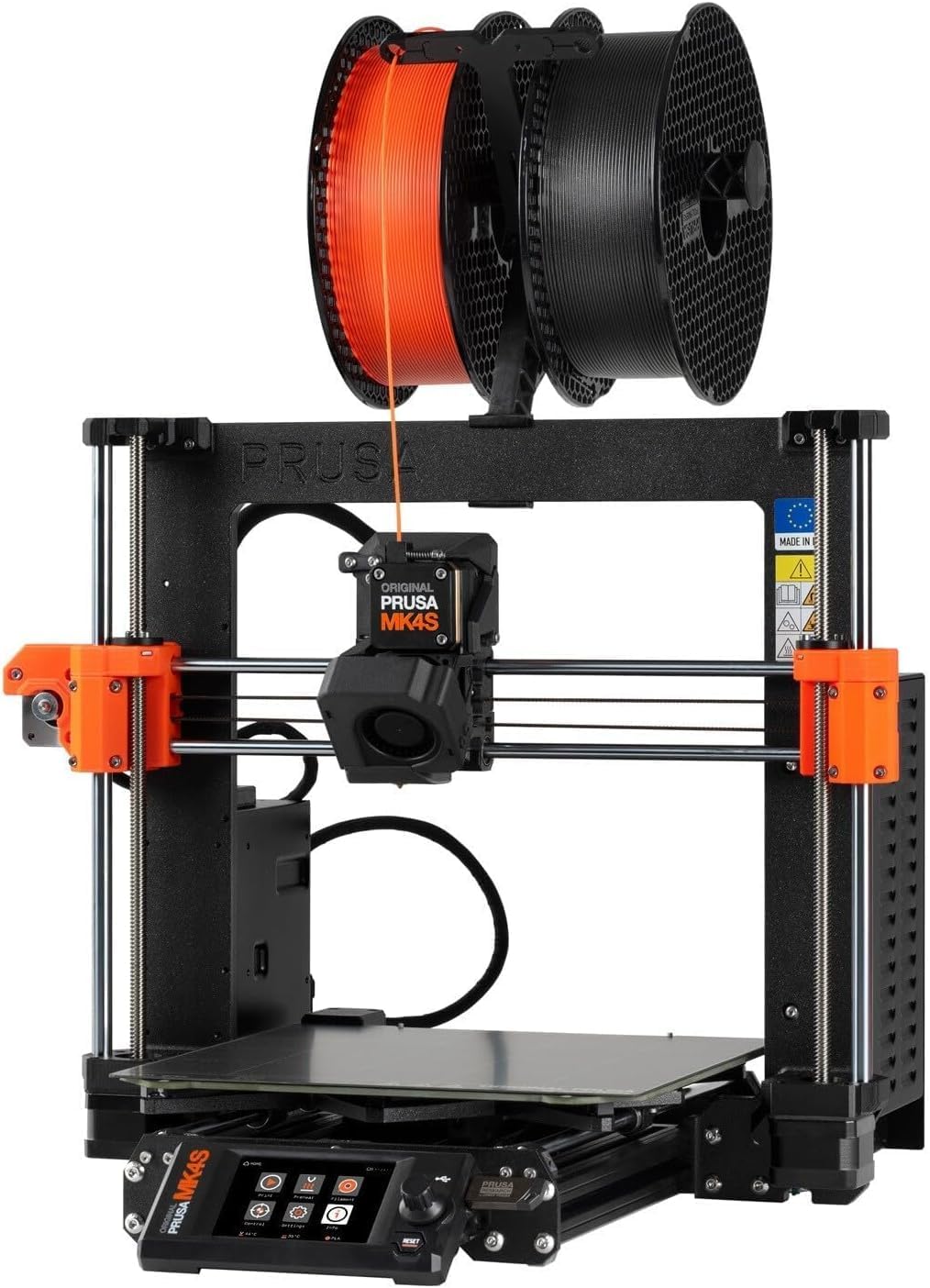 Prusa MK4SBest open ecosystem printerCheck price on Amazon
 Flashforge Adventurer 5M ProBest enclosed printer for a shared roomCheck price on Amazon
 Qidi Plus4Best for engineering filamentsCheck price on Amazon
 Creality K2 Plus ComboBest for large multicolour printsCheck price on Amazon
 Elegoo Saturn 4 UltraBest resin printer overallCheck price on Amazon
 Anycubic Photon Mono M7 ProBest resin printer for throughputCheck price on Amazon
 Elegoo Mars 5 UltraBest compact resin printerCheck price on Amazon
Prices move up and down on Amazon, so we never print a price here that could be stale by the time you read it. Use the price check button to see the current price. Delivery and any setup extras at this level vary by machine and are shown at checkout.
The Best 3D Printer
Each review below sticks to what can be verified: published figures, real material limits, and the ownership facts that follow from them.
Bambu Lab P1S Combo
Start with the shape of the work. Most home printing is brackets, enclosures, toys, jigs and the odd part that must not warp, and the P1S Combo answers all of it from one enclosed box. The build space is a 256 mm cube, the frame is fully closed, and the Combo bundle adds the four spool material system, so a print can carry several colours or a support material without a mid job swap. Heat is the quiet advantage. The nozzle reaches 300 degrees and the closed chamber holds warmth around ABS and ASA parts that curl on an open frame, while PLA and PETG stay easy. The trade is the ecosystem: nozzles, plates and the material system are Bambu Lab parts, bought through Bambu Lab channels, and the printer leans on Bambu Lab software more than an open machine does. Buy it if you want one filament printer that handles the broadest range of home work with the least fuss. Skip it if repairability with generic parts matters more than convenience, or if resin detail is what you actually want.
Pros
- Enclosed 256 mm cube covers most home parts in one build
- Four spool material system included for colour and support work
- 300 degree nozzle opens up ABS, ASA and filled filaments
- Fully closed frame steadies temperature sensitive prints
Cons
- Parts and accessories stay inside one brand ecosystem
- No active chamber heater, so the hottest engineering work sits above it
- Open frame rivals are easier to modify
Bambu Lab A1 mini Combo
Small is the point here, and it is a genuine virtue for a first machine. The build space is a 180 mm cube, which sounds limiting until you count how many first year prints are keyrings, hooks, game pieces, small enclosures and replacement clips. Almost all of them fit, and the ones that do not can usually be split in the slicer. The Combo version carries the lite four spool feeder, so colour printing arrives on day one without a later upgrade hunt. Calibration is automatic, the nozzle still reaches 300 degrees for PETG and TPU alongside PLA, and the open frame keeps the whole thing light enough to move between rooms. What you give up is enclosure and size: ABS warps in open air, and a full size helmet or large storage box will never fit. Buy it if this is your first printer and desk space is tight. Skip it if you already know your parts run large, because you will outgrow the plate rather than the printer.
Pros
- 180 mm cube fits a small desk and most beginner projects
- Four colour printing included through the lite feeder
- Automatic calibration keeps setup short
- 300 degree nozzle still covers PETG and TPU
Cons
- Open frame counts against reliable ABS and ASA printing
- Large parts must be split or printed elsewhere
- No camera grade monitoring at this level
Bambu Lab P2S Combo
Think of the P2S as the P1S idea finished properly. The build space stays a 256 mm cube and the frame stays enclosed, but the details move up a class: a 5 inch touchscreen replaces the small monochrome panel, the camera is a 1080p unit with failure detection, and the hotend swaps quickly when a nozzle change is due. The Combo material unit earns its keep in a way the older system does not, because the AMS 2 Pro dries filament while it feeds, and damp nylon or PETG is a common cause of rough prints that owners blame on the printer. The chamber is still passive, warmed by the bed rather than a separate heater, and the system can grow to 20 filament slots with added units if colour work takes over your bench. Buy it if you like the P1S formula and want the better screen, camera and drying feeder in one purchase. Skip it if you already own a P1S, because the print volume and temperatures are the same.
Pros
- Drying material unit tackles damp filament, a common print fault
- 1080p camera with failure detection for longer jobs
- Quick swap hotend speeds up nozzle changes
- 5 inch touchscreen is far easier to work from
Cons
- Same 256 mm cube and 300 degree ceiling as the cheaper P1S
- Chamber heat is passive, with no separate heater
- Full slot expansion means buying more material units
Prusa MK4S
Where the Bambu Lab machines sell convenience, the MK4S sells control. It is an open frame printer with a 250 by 210 by 220 mm build space, a loadcell sensor that sets the first layer automatically, and a high flow nozzle inside an all metal hotend that reaches 290 degrees, with the bed going to 120 degrees. Layer heights run from 0.05 to 0.30 mm. Everything around it is open in a way the enclosed rivals are not: standard 1.75 mm filament from any brand, a slicer built on open foundations, spare parts sold individually, and an optional five colour upgrade unit for owners who want colour later. The official MK4S product page sets out the full parameter list and the add on path. This assembled version skips the kit build entirely. Buy it if you plan to keep one printer for years, service it yourself and choose your own materials. Skip it if you want an enclosure today or colour printing in the box.
Pros
- Open material system takes any standard 1.75 mm filament
- Loadcell first layer calibration removes a common setup chore
- Assembled form arrives built and tested
- Spare parts and upgrades stay available piece by piece
Cons
- Open frame, so ABS and ASA need a separate enclosure
- Colour printing needs the optional upgrade unit
- Smaller build space than the 256 mm cube rivals
Flashforge Adventurer 5M Pro
Some printers have to live where people live, and that is the whole case for this one. The Adventurer 5M Pro is a fully enclosed CoreXY machine with a 220 mm cube build space, and its air runs through HEPA and activated carbon filtration on both internal and external circulation, which matters when the printer shares a room with a desk, a sofa or a classroom. The nozzle reaches 280 degrees, enough for ABS and ASA alongside the everyday materials, and the nozzle set swaps between 0.25, 0.4, 0.6 and 0.8 mm sizes without tools, so a fine nozzle for detail and a wide one for fast drafts both live in the drawer. There is no multicolour system in the box, and the build cube is a step down from the 256 mm class. Buy it if the printer will run in a shared or lived in room and filtration matters. Skip it if multicolour work or the largest build space is your priority.
Pros
- HEPA and carbon filtration suits shared rooms
- Tool free nozzle swaps across four sizes
- Enclosed frame handles ABS and ASA
- 220 mm cube still covers most household parts
Cons
- No multicolour system included
- Build space trails the 256 mm class
- 280 degree ceiling sits below engineering grade rivals
Qidi Plus4
Heat decides this card, because the Plus4 is built around temperatures the rest of the filament field cannot reach. The chamber heats actively to 65 degrees, the hotend reaches 370 degrees through a bimetal nozzle, and the bed goes to 120 degrees, across a 305 by 305 by 280 mm build space. Nylon, polycarbonate and PPS carbon fibre sit inside that envelope rather than at its edge. The firmware is Klipper based and third party slicers work with it, so the machine is less locked down than its size suggests. Two honest costs follow the capability: at 27 kg it is a two person lift onto the bench, and the multicolour box is a separate purchase, so colour work is not part of the base machine. Buy it if functional parts in engineering filaments are your main work. Skip it if you mostly print PLA models, because you would be paying for heat you never use.
Pros
- Actively heated 65 degree chamber, the hottest here
- 370 degree hotend covers PPS carbon fibre and polycarbonate
- Large 305 mm class build space for functional parts
- Klipper based firmware works with third party slicers
Cons
- Multicolour unit is a separate purchase
- 27 kg makes it a committed bench fixture
- Capability is wasted on PLA only printing
Creality K2 Plus Combo
Scale is the argument. The K2 Plus prints inside a 350 mm cube, heats its chamber actively to 60 degrees, and reaches 350 degrees at the nozzle, so big parts and demanding materials stop being separate purchases. The Combo filament system holds four spools and the setup scales to 16 colours with four units linked. Dual cameras watch the chamber, and the whole machine weighs 35 kg before the filament unit is added, which tells you plainly that this is furniture, not a desktop accessory. For a cosplay armour piece, a full enclosure panel or a production run of large coloured parts, that bulk is the price of admission. For ordinary household printing it is simply too much machine. Buy it if your parts are large, coloured, or both, and you have a permanent home for it. Skip it if your bench is a shared desk or your prints are palm sized.
Pros
- 350 mm cube is the largest filament build space here
- Filament system scales from four to sixteen colours
- Actively heated chamber to 60 degrees
- Dual cameras for monitoring big, long jobs
Cons
- 35 kg printer plus a separate filament unit to house
- Footprint demands a dedicated bench or stand
- Oversized for small everyday prints
Elegoo Saturn 4 Ultra
Cross over to resin and the numbers change units. The Saturn 4 Ultra resolves detail at 19 by 24 microns across a 10 inch 12K screen, over a build area of 218.88 by 122.88 by 220 mm, fine enough that fingerprints on a miniature read as texture. Layers can run from 0.01 to 0.2 mm, and the tilting vat releases each layer quickly, which is where the headline speed comes from. Levelling is automatic, a camera watches for warped or failed prints, and the lid flips up instead of lifting off, saving the shelf space a loose cover needs. The official Saturn 4 Ultra page walks through the tilt release and detection features in full. None of that removes the resin routine: gloves, ventilation, washing and curing are part of every print. Buy it if miniatures, jewellery masters or display models are your main work. Skip it if you need parts that bend, bear load or live outdoors.
Pros
- 19 by 24 micron detail resolves miniature grade surfaces
- Tilt release vat speeds up every layer change
- Automatic levelling and camera detection cut failed prints
- Flip up lid saves space over a lift off cover
Cons
- Every print needs washing and curing afterwards
- Uncured resin is a skin sensitiser and needs ventilation
- Build area is far smaller than any filament pick here
Anycubic Photon Mono M7 Pro
Volume work is where the M7 Pro separates itself from prettier resin machines. Its 10.1 inch 14K screen gives 16.8 by 24.8 micron detail over a 223 by 126 by 230 mm build area, and the vat heats and circulates the resin while an automatic system refills and withdraws it, which keeps long batch runs consistent instead of drifting as the vat empties. With high speed resin at thicker layers the throughput figures climb sharply, and even on standard resin the pace is strong for a plate this size. At 12.8 kg it is also the lightest resin machine in this guide, so moving it to a wash station is realistic. The cost is commitment: heated, auto fed resin handling is machinery to clean, and casual once a month printing does not repay it. Buy it if you print resin in batches, for a game group, a shop or a production hobby. Skip it if you print one miniature at a time, where the Saturn or Mars below does the same job more simply.
Pros
- Heated, circulating vat keeps batch runs consistent
- Automatic resin refill and withdrawal reduces mid print attention
- 14K screen holds fine detail across a wide plate
- Lightest resin pick here at 12.8 kg
Cons
- Resin handling system adds cleaning and maintenance
- Throughput hardware is wasted on occasional printing
- Still needs a separate wash and cure routine
Elegoo Mars 5 Ultra
The smallest resin machine here is the right size for the job most resin buyers actually have. A single squad of miniatures, a set of dice masters or a tray of jewellery blanks fits its 153.36 by 77.76 by 165 mm build area, and the 7 inch 9K screen resolves 18 micron detail, the finest pixel pitch in this guide. It borrows the tilt release idea from its bigger sibling, so layer changes stay quick, and the compact body leaves room on the same bench for the wash and cure station that resin printing requires anyway. What it cannot do is scale: a large display piece or a full batch of terrain will not fit, and no setting changes that. Buy it if your resin work is small, detailed and occasional to regular. Skip it if you already know your models run large, because the Saturn 4 Ultra is the same idea with a plate that fits them.
Pros
- 18 micron detail, the finest pitch in this guide
- Compact body leaves bench room for wash and cure gear
- Tilt release keeps small prints moving quickly
- Lower material use per print than the big plate machines
Cons
- Small build area rules out large models and big batches
- Same gloves, ventilation and curing routine as any resin printer
- No room to grow into bigger work
Filament or Resin: The First Decision
Every other choice in this guide hangs off this one, so make it before you fall for a specific machine. Filament printers melt a spool of plastic and lay it down in lines; resin printers cure a vat of liquid with light, one thin layer at a time. The filament parts come off the plate ready to use and shrug off knocks. The resin parts come off wet, need washing and curing, and reward you with surfaces no filament machine can match.
| Point of difference | Filament (FDM) | Resin (MSLA) |
|---|---|---|
| Print technology | Melted filament laid in lines | Liquid resin cured by screen light |
| Typical build volume class | 180 mm to 350 mm cubes | About 153 by 78 mm to 223 by 126 mm plates |
| Finest layer detail class | 0.05 mm layers at the fine end | 0.01 mm layers, 18 to 25 micron surface detail |
| Material range | PLA, PETG, ABS, ASA, nylon, polycarbonate and filled grades | 405 nm resins in standard, tough, flexible and high speed forms |
| Post-processing burden | Remove supports, print is ready | Wash in solvent, cure under UV, gloves throughout |
| Main running-cost driver | Filament spools, nozzles and plates | Resin, release film, screens and wash solvent |
Choose filament if your prints are functional parts, storage, tools, brackets or anything a child will drop. Choose resin if your prints are miniatures, display models or masters where surface detail is the whole point. Choose the P1S Combo if you want one first machine and your work is mixed household printing. Choose the Saturn 4 Ultra if detail work dominates and you accept the wash and cure routine. Before any purchase, run a quick check on the CPSC recall database for the exact model name, a two minute habit worth keeping for any powered workshop tool.
Also considered
- Creality K1C: Enclosed and quick with a 220 by 220 by 250 mm build space, but it sits between the P1S Combo and the 5M Pro without beating either at its own job.
- Prusa CORE One: An enclosed CoreXY with an actively controlled chamber to 55 degrees and the open Prusa ecosystem, held out only because the MK4S carries the Prusa case here at a simpler level.
- Elegoo Saturn 4 Ultra 16K: A heated tank and finer screen over the standard Ultra, a real step for cold rooms, but the standard Ultra covers most miniature work for less commitment.
- Sovol SV08: A large open source machine for builders who enjoy tuning, better suited to readers who want a project as much as a printer.
- Flashforge AD5X: Four colour printing in a compact open frame CoreXY, a fair pick where colour matters more than enclosure or filtration.
Who this guide is for
First time buyers who want one machine to keep
Start with the technology split, then look at the A1 mini Combo for a gentle entry or the P1S Combo if you would rather buy once and grow into the enclosure, the colour system and the bigger plate.
Tabletop and miniatures printers
Your shortlist is the resin three: the Mars 5 Ultra for small trays, the Saturn 4 Ultra for bigger batches and display pieces, and the M7 Pro when the same models come off the plate every week.
Home makers printing functional parts
Build volume, chamber heat and material range decide your list: the P1S Combo for general work, the Plus4 for engineering filaments, and the K2 Plus Combo when the parts themselves get large.
What to look for when buying a 3d printer
- Technology first, brand second: filament for strength, size and ready to use parts; resin for surface detail, with a wash and cure routine attached to every print.
- Build volume against your real parts: measure the largest thing you genuinely plan to print, then buy the plate that fits it, not the largest plate on the page.
- Chamber and temperatures for your materials: PLA and PETG print anywhere, ABS and ASA want an enclosure, and nylon, polycarbonate and PPS grades want active chamber heat plus a hotend that reaches them.
- Material system openness: an open filament path takes any brand of spool, while a closed system trades that freedom for simpler colour handling and matched parts.
- The second station: resin printers need bench space and budget for washing and curing gear, and filament printers need dry storage for spools, so price the whole setup, not the printer alone.
Sizes, fit and space for a 3D printer
Footprint lies by omission: the printed size is the build volume, but the machine around it is always bigger, and filament machines also need room behind for the moving bed or the material unit, plus headroom for spool holders. The A1 mini Combo is the only pick here that sits comfortably on a small desk corner. The P1S and P2S class needs a sturdy surface around half a metre deep once the door swing and rear tubes are counted. The K2 Plus Combo and Plus4 are bench furniture at 35 kg and 27 kg, so measure the stand, not just the shelf.
Resin machines are smaller on the bench but claim more of the room: space for the printer, a wash container, a curing station and a mat for drips, in a spot with ventilation you can actually open or extract. Keep uncured resin away from living space where you can, and never set a resin printer on carpet. Enclosed filament printers also want airflow clearance at their vents, and every machine here wants a level, vibration steady surface, because a wobbling table prints its wobble into tall parts.
What 3D printers at this level cost to own
Filament is the steady cost: spools are consumed in proportion to how much you print, multicolour work wastes some material on every change, and nozzles and build plates are wear parts that dull, scratch and get replaced. Hardened nozzles last longer on filled filaments, which is why the engineering picks ship with them. Resin costs arrive in more places: the resin itself, release film for the vat, eventual screen replacement, wash solvent, gloves and curing time. A resin printer that sits unused still ages its film and its resin, so occasional resin printing is not free printing.
Most printers here carry a year of warranty, with wear parts such as plates, films and screens covered for less, and support runs through the brand store and support pages rather than a local shop. Spare parts availability is the quiet long term difference: the open ecosystem machines sell individual parts for years, while closed systems depend on the brand continuing to stock their specific components. Delivery is the last reality: the large enclosed machines arrive as heavy single boxes, returns mean repacking that box, and a damaged on arrival machine is far easier to resolve in the first days than the first month, so inspect and run a first print promptly.
Common mistakes when buying a 3d printer
- Buying resin for functional parts: a beautiful bracket that snaps under load teaches the technology lesson the hard way; match the material to the job first.
- Ignoring the second station: ordering a resin printer without wash and cure gear, gloves and ventilation leaves it in the box while the extras ship.
- Chasing the largest plate: a 350 mm cube that never prints above 200 mm still takes the bench, the power and the moving effort of the big machine every day.
- Forgetting dry storage: filament left open in a damp room prints rough and stringy, and owners often blame the printer for a storage problem.
- Skipping the delivery check: heavy enclosed printers can arrive with a cracked panel or a bent frame; unbox, inspect and print within the return window, not after it.
3D Printer Pros and Cons
Pros
- Parts on demand at home, from a broken clip to a custom enclosure, without shipping waits
- Two mature technologies cover opposite needs, strength and size from filament, fine detail from resin
- Multicolour and multi material printing now arrives in the box on mainstream machines
- Open material options keep running costs competitive on the open ecosystem picks
Cons
- Every machine is a hobby to run, with calibration, failed prints and maintenance built in
- Resin handling adds gloves, ventilation, washing and curing to every single job
- Consumables never stop: filament, resin, nozzles, plates, films and screens all wear out
- Large enclosed machines are heavy, hard to place and awkward to return
Who should not buy a 3d printer
If you need a finished object once, a local library maker space, a school workshop or a print service will hand it to you without a machine living on your bench, a shelf of consumables and a new hobby competing for your evenings. A 3D printer rewards people who enjoy the process as much as the part; if the process sounds like a chore, rent the outcome instead.
Best 3D Printer: Frequently Asked Questions
What is the best 3D printer for beginners?
A small enclosed free filament machine with automatic calibration is the gentlest start, which is why the A1 mini Combo leads the beginner case here: colour printing is included, setup is short, and the 180 mm plate covers most early projects. Buy the P1S Combo instead if you already know the hobby will stick.
Is resin or filament better for miniatures?
Resin, and it is not close: the resin picks here resolve detail at 18 to 25 microns, far finer than filament lines, so faces, cloth texture and thin weapons print cleanly. The price of that detail is the wash and cure routine and gloves for every print.
What do you give up with a printer under 300?
Usually build volume, enclosure and temperature headroom: the under 300 class prints PLA and PETG well in smaller sizes, but ABS warps without a chamber and large parts do not fit. Detail and speed on the best small machines are genuinely good, so the sacrifice is scope, not quality.
How much space and noise does a home 3D printer need?
A compact filament machine fits a desk corner, while the big enclosed picks need a dedicated sturdy bench and weigh 27 to 35 kg. Enclosed machines run quieter and contain smell better than open frames, and resin printers need a ventilated spot with room for washing gear beside them.
What does a 3D printer cost to run?
Filament machines consume spools, nozzles and build plates in proportion to use, while resin machines add resin, vat film, screens and wash solvent. Multicolour filament printing wastes some material per colour change, and a drying feeder or dry boxes add a small ongoing cost that pays back in fewer failed prints.
Keep researching
Still weighing the two technologies, or narrowing a shortlist inside one of them? The hub pages below gather the rest of our printer coverage in one place.
- 3D printer hub: every Pick Hearth 3D printer guide, from first machines to flagship and resin coverage.
- Laptops & Tech hub: the wider tech desk, including printers, accessories and home workshop gear.
More in Laptops & Tech: browse the full Laptops & Tech hub for the rest of our tech guides.
How we check 3d printers like these
Read the full Pick Hearth methodology- Premise and specifications checked against the manufacturer's stated figures for every machine, including build volume, temperatures and material lists.
- Limits, capacities and claims taken from manufacturer documents, with speed and throughput figures treated as the marketing numbers they are.
- No brand can pay for a place, and affiliate earnings never change the order.
First published · Updated in place as products and specs change